
Security Compliance
Troubleshooting update management task failure issues Patch manager
This article addresses a failed task that appears in Task History after you run an update management task against a group of computers in the Patch Manager Administrator Console.
First published date
7/5/2019 2:54 PM
Last published date
7/10/2019 2:41 PM
Overview
Scenario 1: None of the Scheduled tasks did not kick start
- You have configured some scheduled tasks that are configured to "Run-Once" as task type
- The task was executed at the scheduled time/date
- You modified the same scheduled tasks to run again at a future date, but none of these modified tasks ran
Scenario 2:
When you run an update management task against a group of computers from the Patch Manager Administrator console, the task fails in Task history.
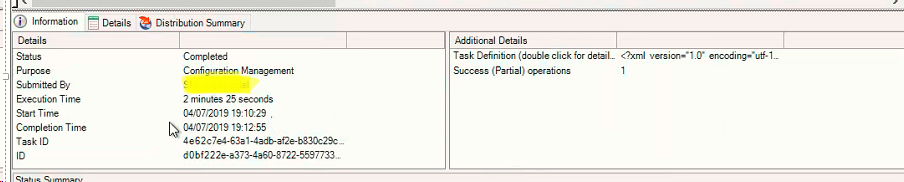
The worker process job log specific to this task displays error(s), which indicate a problem with WMI providers (they may be corrupted).
Scheduled Autopublish tasks fails due to lack of free disk apace on the Patch manager server, you might see following error(s) in Datagrid service logs:
- You have configured some scheduled tasks that are configured to "Run-Once" as task type
- The task was executed at the scheduled time/date
- You modified the same scheduled tasks to run again at a future date, but none of these modified tasks ran
Scenario 2:
When you run an update management task against a group of computers from the Patch Manager Administrator console, the task fails in Task history.
The worker process job log specific to this task displays error(s), which indicate a problem with WMI providers (they may be corrupted).
2019/07/04 19:12:41:543 PID: 6748 TID:  9464 [VERB] JobThreadPool::CheckCompletion() all tasks are not complete and we will update the lasttimewehadworktodo
2019/07/04 19:12:41:543 PID: 6748 TID:  9364 [ERROR] UpdateManagementExecute::Execute() failed. Message: Provider load failure
Stack Trace:    at System.Management.ManagementException.ThrowWithExtendedInfo(ManagementStatus errorCode)
   at System.Management.ManagementObjectCollection.ManagementObjectEnumerator.MoveNext()
Scenario 3:
Scheduled Autopublish tasks fails due to lack of free disk apace on the Patch manager server, you might see following error(s) in Datagrid service logs:
2020/01/29 01:25:16:162 PID: 1648 TID: 14028 [ERROR] FileSystemObjectOperations::Copy failed. Error: There is not enough space on the disk.
2020/01/29 01:25:16:178 PID: 1648 TID: 14028 [ERROR] TaskManager::ProcessAutopublishingPrerequisites() failed. Message: System.IO.IOException: There is not enough space on the disk.
   at System.IO.__Error.WinIOError(Int32 errorCode, String maybeFullPath)
   at System.IO.File.InternalCopy(String sourceFileName, String destFileName, Boolean overwrite, Boolean checkHost)
   at System.IO.FileInfo.CopyTo(String destFileName, Boolean overwrite)
Product section
Patch Manager
Cause
- Corrupted WMI providers
- Disk space on C:\ drive is running out on PM or WSUS server
- Access denied to WMI name space for the account used in WMI name space
Resolution
Solution 1:
- This is expected i.e Scheduled task type "Run-Once" tasks will run only once and should not be modified to run in future again. This is confirmed as known design bug (as of PM 2019.4 )
- As a work around, please use one of the Other task types highlighted below. To do this you have to re-create these tasks.
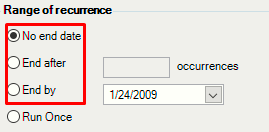
OR
you could run the following query to update existing Run-Once job after modifying the next run date
Solution Scenario 2:
1. Select all failed nodes that have similar errors.
2. Deploy the WMI Providers / components.
3. Re-run the task again.
If some or all of these nodes report the same errors, do the following:
Please check disk pace on C:\ + WSUS content drive on both WSUS and PM server(s) and free up space by identifying what is taking up space, you can use Treesize Free application(third party) for this.
Here are some other useful links related to scheduled task in Patch manager
- This is expected i.e Scheduled task type "Run-Once" tasks will run only once and should not be modified to run in future again. This is confirmed as known design bug (as of PM 2019.4 )
- As a work around, please use one of the Other task types highlighted below. To do this you have to re-create these tasks.
OR
you could run the following query to update existing Run-Once job after modifying the next run date
USE [EminentWare]
GO

UPDATE [dbo].[ewbatchtasks]
   SET [executetime] = 0
WHERE [allowedrecurrences] = 1 AND [recurrencetype] = 2
GO
Solution Scenario 2:
1. Select all failed nodes that have similar errors.
2. Deploy the WMI Providers / components.
3. Re-run the task again.
If some or all of these nodes report the same errors, do the following:
- Check if any of these machines have a pending reboot.
- Ping to make sure they are reachable and resolve to the correct host & IP address.
- Check for antivirus / firewall restrictions for WMI connectivity.
Please check disk pace on C:\ + WSUS content drive on both WSUS and PM server(s) and free up space by identifying what is taking up space, you can use Treesize Free application(third party) for this.
Here are some other useful links related to scheduled task in Patch manager
- Unable to add computers to new or scheduled jobs or tasks
- Schedule a WSUS inventory task
- Schedule inventory tasks to populate empty reports
- Error when scheduling Update Management with rules tasks
- Email notifications are not received when a scheduled task is completed
- Update the time and date on a scheduled task
- How to modify a scheduled task in Patch Manager
- Scheduled tasks fail in Patch Manager