
Tools
Getting an error "The connection cannot be established. The agent installed on the machine must be removed. After removing the agent, try again to establish a connection" when connecting via Dameware Mini Remote Control (MRC) running 12.2
This article provides details of when the latest version of the Dameware Mini Remote Control client cannot access remote computers running an old version of Agent and the error, "The connection cannot be established. The agent installed on the machine must be removed. After removing the agent, try again to establish a connection" keeps appearing.
First published date
7/19/2021 7:03 PM
Last published date
2/3/2026 11:42 PM
Overview
Starting Dameware Mini Remote Control 12.2.0, tech that uses the latest version of DMRC client cannot connect to the remote computer with an agent running version 12.1.2 and below.
This was included of all of the Release Notes of the latest versions starting 12.2.0
Due to improved security standards, Dameware 12.3 is not compatible with agent versions earlier than Dameware 12.2. Agents must be removed, and version 12.3 installed again through the application or re-installed via the agent installer.
Ref: Dameware 12.3 Release Notes
When you connect to the remote computers that run MRC agent version 12.1.2 and below, you will get an error "The connection cannot be established. The agent installed on the machine must be removed. After removing the agent, try again to establish a connection".
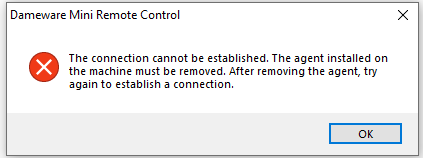
In this version, there are many changes to the codes and it’s core components to address the issues and vulnerabilities. The over-the-top upgrade will no longer work on this release. It is required to fully uninstall the old MRC agent and then install the new one.
This was included of all of the Release Notes of the latest versions starting 12.2.0
Due to improved security standards, Dameware 12.3 is not compatible with agent versions earlier than Dameware 12.2. Agents must be removed, and version 12.3 installed again through the application or re-installed via the agent installer.
Ref: Dameware 12.3 Release Notes
When you connect to the remote computers that run MRC agent version 12.1.2 and below, you will get an error "The connection cannot be established. The agent installed on the machine must be removed. After removing the agent, try again to establish a connection".
In this version, there are many changes to the codes and it’s core components to address the issues and vulnerabilities. The over-the-top upgrade will no longer work on this release. It is required to fully uninstall the old MRC agent and then install the new one.
Product section
Dameware Remote Support & Mini Remote Control
Cause
- There are Security updates to the MRC client that started in version 12.2.0.
- The Dameware client is not compatible with the version agent, and they must be on the same version.
Resolution
Uninstall the old MRC agent (12.1.2 and below) and then install the new version.
See the steps via MRC on-demand (Per machine)
Install the Dameware Mini Remote Control (DMRC) client Agent Service and remove the MRC Agent Service
See the steps using Dameware Remote Support (By Batch)
Remove the Dameware Mini Remote Control (DMRC) Client Agent Service the from Dameware Remote Support (DRS) batching process
Removing the agent can also be done via GPO, SCCM, etc.
Window administrators can do it using the same procedure when uninstalling any other services.
The administrator can also run the uninstall script below via GPO, SCCM, etc.
After uninstalling the old version of Dameware Agent on all target remote machines, you need to install the latest version of DMRC agent on all of your remote machines.
You can download the installer from the SolarWinds Customer Portal.
You can also create your Dameware Agent MSI Package with the Dameware Mini Remote Control Client Agent MSI Builder.
Ref: Creating an MSI Package with the Dameware Mini Remote Control Client Agent MSI Builder
Once you already have your Agent installer, you can use this to deploy to all of your machines via GPO, SCCM and other deployment applications available in your environment:
See the steps via MRC on-demand (Per machine)
Install the Dameware Mini Remote Control (DMRC) client Agent Service and remove the MRC Agent Service
See the steps using Dameware Remote Support (By Batch)
Remove the Dameware Mini Remote Control (DMRC) Client Agent Service the from Dameware Remote Support (DRS) batching process
Removing the agent can also be done via GPO, SCCM, etc.
Window administrators can do it using the same procedure when uninstalling any other services.
The administrator can also run the uninstall script below via GPO, SCCM, etc.
net stop dwmrcs
cd C:\Windows\dwrcs
dwrcs.exe -remove
-- Scripts are not supported under any SolarWinds support program or service.
-- Scripts are provided AS IS without warranty of any kind. SolarWinds further
-- disclaims all warranties including, without limitation, any implied warranties
-- of merchantability or of fitness for a particular purpose. The risk arising
-- out of the use or performance of the scripts and documentation stays with you.
-- In no event shall SolarWinds or anyone else involved in the creation,
-- production, or delivery of the scripts be liable for any damages whatsoever
-- (including, without limitation, damages for loss of business profits, business
-- interruption, loss of business information, or other pecuniary loss) arising
-- out of the use of or inability to use the scripts or documentation.
After uninstalling the old version of Dameware Agent on all target remote machines, you need to install the latest version of DMRC agent on all of your remote machines.
You can download the installer from the SolarWinds Customer Portal.
You can also create your Dameware Agent MSI Package with the Dameware Mini Remote Control Client Agent MSI Builder.
Ref: Creating an MSI Package with the Dameware Mini Remote Control Client Agent MSI Builder
Once you already have your Agent installer, you can use this to deploy to all of your machines via GPO, SCCM and other deployment applications available in your environment:
msiexec /i C:\Installer_Location /qn
-- Scripts are not supported under any SolarWinds support program or service.
-- Scripts are provided AS IS without warranty of any kind. SolarWinds further
-- disclaims all warranties including, without limitation, any implied warranties
-- of merchantability or of fitness for a particular purpose. The risk arising
-- out of the use or performance of the scripts and documentation stays with you.
-- In no event shall SolarWinds or anyone else involved in the creation,
-- production, or delivery of the scripts be liable for any damages whatsoever
-- (including, without limitation, damages for loss of business profits, business
-- interruption, loss of business information, or other pecuniary loss) arising
-- out of the use of or inability to use the scripts or documentation.