
Applications Systems
Transactions are unknown - Location not responding
Location is not reponding but appears green in the web console. Transactions are showing gray / unknown status in the webconsole. Unable to get agent details from agent.
First published date
7/28/2020 6:37 PM
Last published date
7/29/2020 3:41 AM
Overview
Player Location may appear green and test as up but all transactions are not playing that are assigned to the Player. Transactions on all other locations are likely to also appear gray / unknown status in the web console.
Error in the SEUMJobs.log (C:\ProgramData\SolarWinds\Logs\SEUM\)
Error in the SEUMJobs.log (C:\ProgramData\SolarWinds\Logs\SEUM\)
ERROR SolarWinds.SEUM.Jobs.AgentDetailsController - Unable to get agent details from agent.
SolarWinds.SEUM.Jobs.AgentClientException: Location Not Responding.
   at SolarWinds.SEUM.Jobs.AgentClient.GetHttpResponse(String api, String method, Stream dataStream, String contentType, Dictionary`2 customHeaders)
   at SolarWinds.SEUM.Jobs.AgentClient.GetHttpResponse(String api, String method, Dictionary`2 postVariables, Dictionary`2 customHeaders)
   at SolarWinds.SEUM.Jobs.AgentClient.GetAgentDetails()
   at SolarWinds.SEUM.Jobs.AgentDetailsController.Execute(AgentJobSettings settings)
Product section
Web Performance Monitor
Cause
Unknown
Resolution
Repair the WPM module on the main WPM application server. This is typically the main polling engine but it can also be additional polling engines.
Please note: This will bring down polling services for the duration of the Configuration Wizard.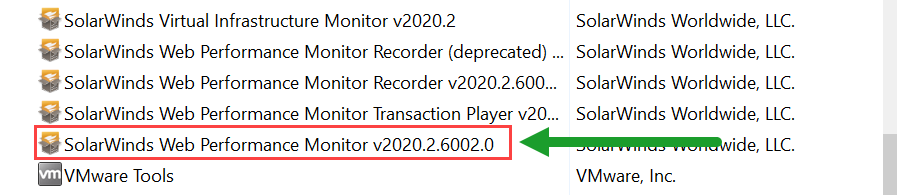
To determine which polling engine the Player Location is assigned to; go to Settings > All Settings > WPM Settings > Manage Player Locations > select the Player of interest and click Edit > Expand the Advanced section to view the assigned poller in the dropdown.
Please note: This will bring down polling services for the duration of the Configuration Wizard.
- RDP to the polling engine.
- Open 'Programs & Features'.
- Right click the Solarwinds Web Performance Monitor vX.X. - NOTE: be sure you're repairing the main application and not the Playback Player or the Recorder.
- This will automatically launch the Configuration Wizard. If it does not, launch the Configuration Wizard located in the Start Menu under SolarWinds Orion.
- Once the Configuration Wizard is complete, open the Orion web console and check the status of your transactions and/or player location(s).