
Tools
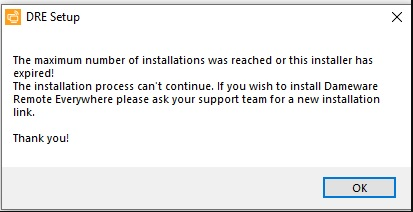
The maximum number of installations was reached or this installer expired appears when installing the Dameware Remote Everywhere (DRE) agent
This article describes a resolution on the agent installation error.
First published date
7/31/2020 3:13 PM
Last published date
2/12/2025 12:47 AM
Overview
The DRE agent can be downloaded from the DRE Admin Area/Dashboard in the Download menu. There are situations that the customer would get the error for several possible reasons.
Product section
Dameware Remote Everywhere
Cause
1. The user has reached the license limit for installation.
2. The user has reached the installation limit or expiration date for the Agent installer in use.
3. The end-user system time is not synchronized correctly.
2. The user has reached the installation limit or expiration date for the Agent installer in use.
3. The end-user system time is not synchronized correctly.
Resolution
1. Check if the number of installations has not yet reached the limit.
2. By default, the downloaded agent from DRE dashboard is valid for 30 days only; to resolve it, download a new agent from DRE Dashboard.
3. Or create an unattended agent without expiration, see How To Set Download Link And Agents Without Expiration Date in Dameware Remote Everywhere (DRE).
4. Verify and fix, if necessary, the system time on the device to match the time timezone, allowing the agent to check in with the relevant infrastructure and register the installation.
2. By default, the downloaded agent from DRE dashboard is valid for 30 days only; to resolve it, download a new agent from DRE Dashboard.
3. Or create an unattended agent without expiration, see How To Set Download Link And Agents Without Expiration Date in Dameware Remote Everywhere (DRE).
4. Verify and fix, if necessary, the system time on the device to match the time timezone, allowing the agent to check in with the relevant infrastructure and register the installation.