
Network Management
Remove orphaned standby High Availability servers
When the HA servers are rebuilt, orphans could show up in the High Availability Deployment Summary page.
First published date
10/26/2018 10:30 AM
Last published date
1/21/2026 5:17 PM
Overview
• This article provides information and steps to resolve the issue when the NPM server High Availability (HA) Deployment Summary status shows as down with no obvious way to remove the server. The steps also resolve issues with inconsistencies in HA tables.
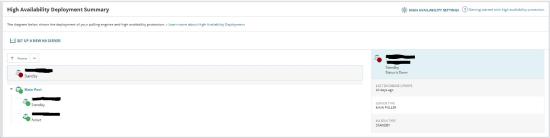
• This also applies when a newly created standby server became an additional polling engine. Even uninstall and reinstalled as HA standby, it still coming up as active additional polling engine.
• This also applies when a newly created standby server became an additional polling engine. Even uninstall and reinstalled as HA standby, it still coming up as active additional polling engine.
Product section
Orion Platform
Cause
The issues are caused by orphaned HA servers that can occur as a result of an incomplete cleanup of the SolarWinds Platform database.
Resolution
To resolve the issue, clean up HA tables following steps below:
- If the orphaned server is a part of a pool, delete the pool .
- Stop the SolarWinds High Availability service on the orphaned server using Windows Service Manager (Note: this service does not show up in SolarWinds Platform Service Manager).
- In the following code, provide the orphaned server hostname instead of ServerHostname, and run the script in SQL Management Studio or in Database Manager. The script will delete references to the orphaned server from the database. See: Use Database Manager to view the SolarWinds database
-- Scripts are not supported under any SolarWinds support program or service.
-- Scripts are provided AS IS without warranty of any kind. SolarWinds further
-- disclaims all warranties including, without limitation, any implied warranties
-- of merchantability or of fitness for a particular purpose. The risk arising
-- out of the use or performance of the scripts and documentation stays with you.
-- In no event shall SolarWinds or anyone else involved in the creation,
-- production, or delivery of the scripts be liable for any damages whatsoever
-- (including, without limitation, damages for loss of business profits, business
-- interruption, loss of business information, or other pecuniary loss) arising
-- out of the use of or inability to use the scripts or documentation.

DECLARE @Hostname nvarchar(max)
SET @Hostname = 'NAME'
DECLARE @PMID int = (SELECT TOP 1 [PoolMemberId] FROM [HA_PoolMembers] WHERE [HostName] = @Hostname)

DELETE FROM [OrionServers] WHERE HostName = @Hostname
DELETE FROM [HA_FacilitiesInstances] WHERE [PoolMemberId] = @PMID
DELETE FROM [HA_PoolMemberInterfacesInfo] WHERE [PoolMemberId] = @PMID
DELETE FROM [HA_ResourcesInstances] WHERE [PoolMemberId] = @PMID
DELETE FROM [HA_PoolMembers] WHERE [PoolMemberId] = @PMID
- If you want to continue using the server as a High Availability server, ensure that both InstallType and RunType values must be AdditionalPollerStandby in the registry and then run the Configuration wizard on the server. The Configuration Wizard provides information about the server in the OrionServers table. See: Run the SolarWinds Platform Configuration wizard.
Once completed, you will no longer see the orphaned server in HA, and all inconsistencies will be resolved.