
Applications Systems
Docker Container Monitoring in Solarwinds Orion
This article provides steps on how to monitor your docker container(s) in Solarwinds Orion
First published date
2/14/2020 9:27 AM
Last published date
2/14/2020 9:27 AM
Overview
This article provides steps on how to monitor your docker container(s) in Solarwinds Orion. Please note, you need to have either SAM Or VMAN license to be able to monitor containers.
Refer to the resolution section below for complete steps.
Refer to the resolution section below for complete steps.
Product section
Virtualization Manager
Cause
NA
Resolution
Following steps Applicable to Docker CE / Docker EE and tested in Ubuntu 18.04
1. Follow the requirements guide at Monitor containers in the Orion Platform
2. Check Docker Port requirements for container monitoring in the Orion Platform
3. Follow the Add container Service Wizard in Orion web console
4. At step 7 you will be asked to copy the script (example below) that will have to be run on the host running the container services

5. Next, execute the docker-compose.yaml file by running the following command to download the required pre-requisite dependencies from Solarwinds.
Note, you may have to do list resources if you like to monitor other container properties.
You can adjust polling intervals for container services on the Global tab of the Advanced Configuration page (http://localhost/Orion/Admin/AdvancedConfiguration/Global.aspx). Changes apply to future container services added to the Orion Platform
1. Follow the requirements guide at Monitor containers in the Orion Platform
2. Check Docker Port requirements for container monitoring in the Orion Platform
3. Follow the Add container Service Wizard in Orion web console
4. At step 7 you will be asked to copy the script (example below) that will have to be run on the host running the container services
$sudo  curl -o docker-compose.yaml https://yourOrionServerURL/Orion/CMAN/Services/DeploymentFile.ashx?guid=5ff03769-ec54-4605-904f-8467652c40fd
$read -sp 'Please enter Orion console password: ' v && echo -n 'ORION_PASSWORD='$(echo -ne $v | base64) > ./.env  && echo
You will see a file named "docker-compose.yaml" downloaded locally
5. Next, execute the docker-compose.yaml file by running the following command to download the required pre-requisite dependencies from Solarwinds.
$sudo docker-compose up -dIf you get command not found at this step then,
$sudo apt-get install docker-composeAnd you should see following output
WARNING: The Docker Engine you're using is running in swarm mode.

Compose does not use swarm mode to deploy services to multiple nodes in a swarm. All containers will be scheduled on the current node.

To deploy your application across the swarm, use `docker stack deploy`.

Creating network "labuser_default" with the default driver
Creating volume "labuser_cman-volume" with default driver
Pulling scope (weaveworks/scope:1.8.0)...
1.8.0: Pulling from weaveworks/scope
550fe1bea624: Pull complete
d9c4209a46c9: Pull complete
2c163db88610: Pull complete
45af6fee2cfc: Pull complete
39ebea0d0b9d: Pull complete
a989ceae5afa: Pull complete
4291b1d894ad: Pull complete
6e7c71c082c6: Pull complete
e19632c37180: Pull complete
07f034823a09: Pull complete
Digest: sha256:608691da855b66a625530ef1d5fb87fb6acc50e6e4b7cf348e515a8ff181335e
Status: Downloaded newer image for weaveworks/scope:1.8.0
Pulling scope2orion (solarwinds/orion:v3_stable)...
v3_stable: Pulling from solarwinds/orion
e7c96db7181b: Pull complete
144ed2401f00: Pull complete
47592b5d7fae: Pull complete
Digest: sha256:92b283b5a6b7318000180fb16095c0d223a276fe889ca214d3101a8641e6cfc9
Status: Downloaded newer image for solarwinds/orion:v3_stable
Creating orion-orionaggregator ...
Creating weaveworks_scope ...
Creating orion-orionaggregator
Creating orion-orionaggregator ... done
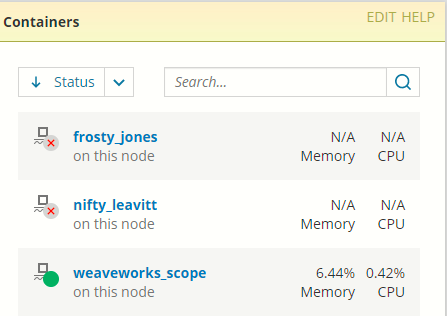
6. Wait for 5 to 10 minutes, you should see your Docker container service in our web console when you click on Node details of the node that is hosting Containers
Note, you may have to do list resources if you like to monitor other container properties.
You can adjust polling intervals for container services on the Global tab of the Advanced Configuration page (http://localhost/Orion/Admin/AdvancedConfiguration/Global.aspx). Changes apply to future container services added to the Orion Platform