
Tools
Disable desktop wallpaper when connecting to a remote computer in Dameware Mini Remote Control (MRC)
This article describes the procedure on how to disable/enable desktop wallpaper.
First published date
8/19/2021 1:30 AM
Last published date
1/20/2026 10:24 PM
Overview
When connecting to the remote computer using the Dameware MRC, it automatically disables the desktop wallpaper. However, in some cases, this setting is modified, and it needs to change.
Product section
Dameware Remote Support & Mini Remote Control
Resolution
1. Open Dameware MRC.
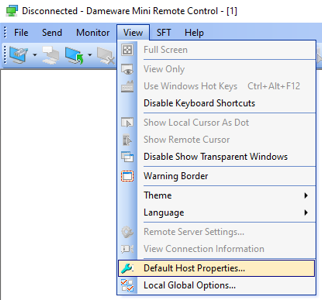
2. Click the View menu, then select the Default Host Properties.
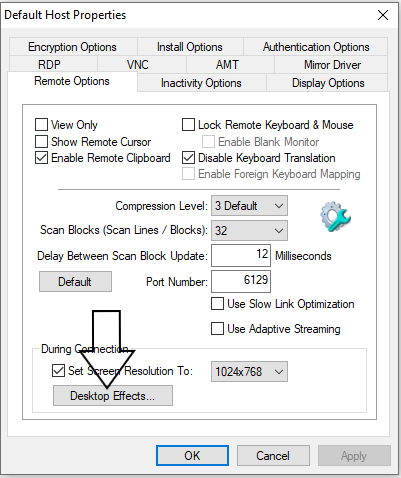
3. Under the Remote Options tab, click Desktop Effects.
4. Mark the Disable Desktop Wallpaper.
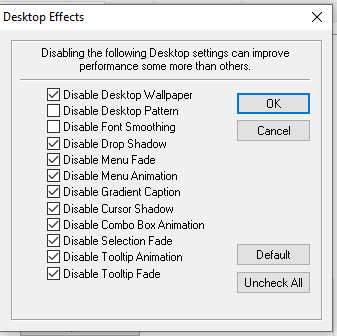
You can also modify other settings if required..
If issue persists, try the resolution from this article as well: Screen resolution problem on 4K monitor during Dameware remote connection
2. Click the View menu, then select the Default Host Properties.
3. Under the Remote Options tab, click Desktop Effects.
4. Mark the Disable Desktop Wallpaper.
You can also modify other settings if required..
If issue persists, try the resolution from this article as well: Screen resolution problem on 4K monitor during Dameware remote connection