
Network Management
Configuration Wizard hitting a Failure: Configuration step Update database account failed with error: The user name or password is incorrect
This article shows how to isolate and resolve a Configuration Wizard hitting a Failure: Configuration step Update database account failed with error: The user name or password is incorrect.
First published date
8/5/2021 12:03 AM
Last published date
2/12/2025 5:25 AM
Overview
Completing the Configuration Wizard hits a failure similarly showing below:
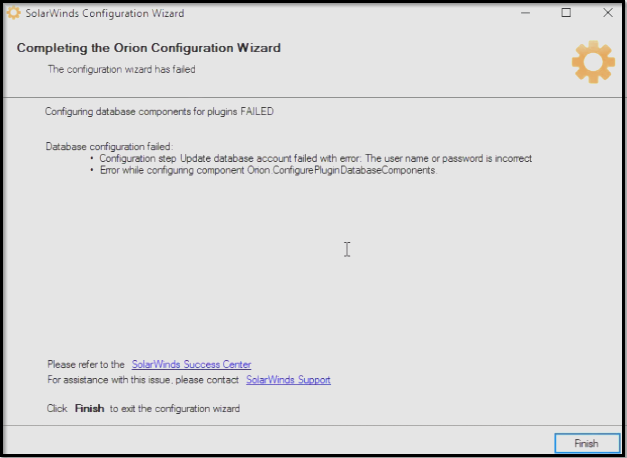
ERROR seen in the ConfigurationWizard.log (C:\ProgramData\SolarWinds\Logs\Orion)
ERROR seen in the ConfigurationWizard.log (C:\ProgramData\SolarWinds\Logs\Orion)
ERROR ConfigurePluginDatabaseComponents - Failed configuring component Log Analyzer (479) 1
SolarWinds.ConfigurationWizard.Plugin.Orion.ConfigurePluginComponents+ComponentConfigurationException: Aborting configuration --->
SolarWinds.ConfigurationWizard.Common.ConfigurationException: Configuration step Update database account failed with error:
The user name or password is incorrect ---> System.ComponentModel.Win32Exception: The user name or password is incorrect
Product section
Network Performance Monitor
Cause
Incorrect SQL Database user name or password preventing the Configuration Wizard from completing successfully.
Resolution
- Perform steps to Verify the SQL and Orion server connectivity using the UDL file
- If the test connection fails just like below:
(Screenshot property of © 2018 Microsoft)
- RDP to the SQL Server and update/reset the user password to make sure that the correct one is being used to complete the Configuration Wizard
- Update the SQL password for Orion by a re-run of the Configuration Wizard