
Network Management
Configuration Wizard Error: Access to the Path is denied
While upgrading to NPM 12, the Configuration Wizard stops early with an error message. The error states: Configuration Wizard Error: Access to the Path 'C:\InetPub\SolarWinds' is denied
First published date
10/25/2018 11:45 AM
Last published date
12/3/2021 9:12 PM
Overview
Symptom 1
The Solarwinds Configuration Wizard stops early with an error message.
"Access to the path 'C:\Inetpub\SolarWinds' is denied
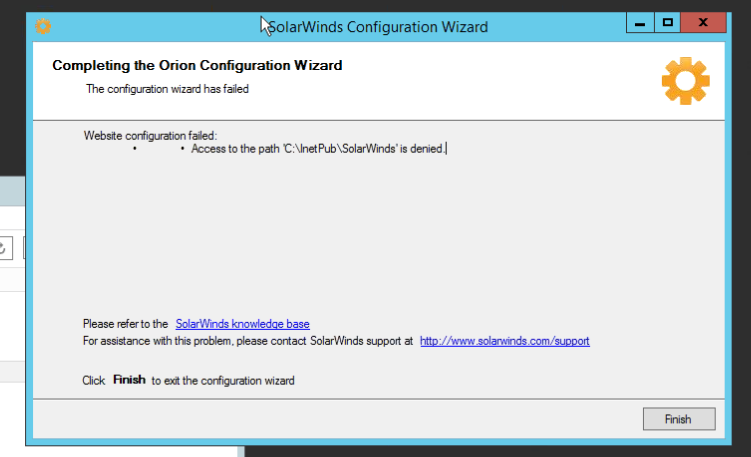
Symptom 2:
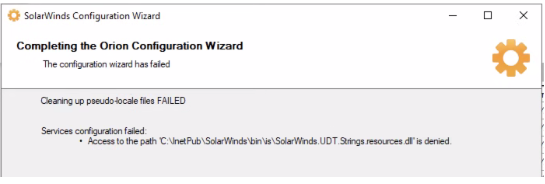
In some cases you may also find the wizard stops with below error:
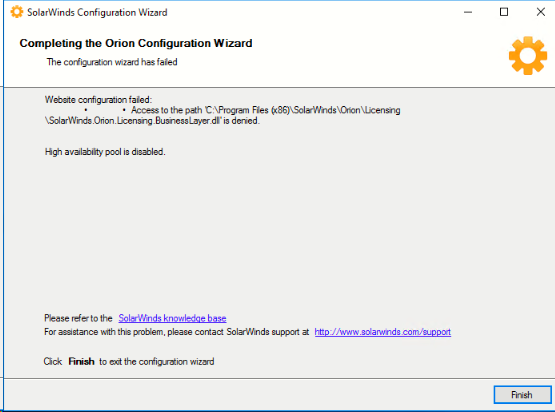
or
The Solarwinds Configuration Wizard stops early with an error message.
"Access to the path 'C:\Inetpub\SolarWinds' is denied
Symptom 2:
In some cases you may also find the wizard stops with below error:
or
Product section
Network Performance Monitor
Cause
- File probably locked by other process or permissions problem on the folders
Resolution
For both symptoms step 3 below is worth checking.
-Right-click the Orion Installer then "Properties" and "Unblock" and OK then right-click and choose Install as an Administrator.
-Check the file on the path if it is being used by another process:
Open the file location specified on the Error on ConfigWizard Log (located at C:\ProgramData\Solarwinds\Logs\Orion)
Backup the file first then Try deleting the file
It should return an error from Windows Saying that the file is in use by an application
Look for the application that is using the file on Task Manager. Select then End Task
Re-Run Config Wizard
-If the issue persists, try rebooting the server
- Login as Local Admin on the Orion server
- Open IIS Manager.
- Under Sites,> verify NetPerfMon is running and bindings are correct.
- Check permissions using the Orion Permission Checker and fix
- Make sure UAC and Antivirus is Disabled
- Run Configuration Wizard again.
- Also check to make sure no Solarwinds Services and processes are running via windows service manager (services.msc) and task manager.
- Ensure Antivirus Exclusions in place on all Orion Servers if the servers have AV installed
- Re-run the config wizard.
-Right-click the Orion Installer then "Properties" and "Unblock" and OK then right-click and choose Install as an Administrator.
-Check the file on the path if it is being used by another process:
Open the file location specified on the Error on ConfigWizard Log (located at C:\ProgramData\Solarwinds\Logs\Orion)
Backup the file first then Try deleting the file
It should return an error from Windows Saying that the file is in use by an application
Look for the application that is using the file on Task Manager. Select then End Task
Re-Run Config Wizard
-If the issue persists, try rebooting the server