
Security Compliance
Catalogs synchronize successfully but new packages are not added
This article addresses an issue where Software Publishing successfully synchronizes a catalog, but new packages are not added to Patch Manager.
First published date
10/17/2018 10:26 PM
Last published date
10/17/2018 10:26 PM
Overview
Scenario 1: Patch Manager with a Commercial key
In the Patch Manager Admin Console, Software Publishing successfully synchronizes a catalog. However, the new packages and the latest updates are not added to Patch Manager.
Scenario 2: Patch Manager with a TEMP key
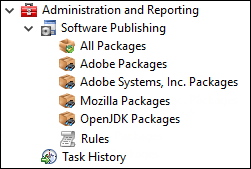
The same behavior occurs when you try to synchronize third-party packages in a test environment with a TEMP support key. You cannot add new packages, such as Notepad++, Chrome, WinZip, and so on. Only the following packages display:
In the Patch Manager Admin Console, Software Publishing successfully synchronizes a catalog. However, the new packages and the latest updates are not added to Patch Manager.
Scenario 2: Patch Manager with a TEMP key
The same behavior occurs when you try to synchronize third-party packages in a test environment with a TEMP support key. You cannot add new packages, such as Notepad++, Chrome, WinZip, and so on. Only the following packages display:
Product section
Patch Manager
Cause
- The Patch Manager Application Server settings for catalog settings and subscription are corrupted.
- You are using a TEMP support key and not a Commercial key.
Resolution
Solution for Scenario 1
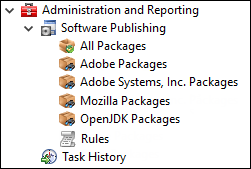
This is by design. Temp / Evaluation licenses only display a maximum of five catalogs.
For example:
- Log in to the Patch Manager Admin Console.
- In the navigation menu, expand Patch Manager System Configuration > Patch Manager Servers and select Application Servers.
- Select the Primary Application Server in the center pane.
- Click the Application Server Settings tab.
- Click the sort icon and select Patch Manager Update.
- Double-click Catalogs Settings.
- In the Catalog Settings dialog box, delete the content, and then click OK.
- Double-click Subscription.
- In the Subscription dialog box, delete the content and then click OK.
- Close the Patch Manager Admin Console.
- Restart the EminentWare Data Grid Server Service.
- Open the Patch Manager Admin Console.
- Expand Administration and Reporting and select Software Publishing.
- In the Actions pane, click Patch Manager Configuration Wizard.
- Complete the steps in the Third Party Updates Configuration Wizard.
The catalogs synchronize and contain the missing updates should be visible.
If the catalogs do not update automatically, manually update the catalogs. See Import Catalogs for Patch Manager on a secure or disconnected network for details.
This is by design. Temp / Evaluation licenses only display a maximum of five catalogs.
For example: