
Network Management
Cannot open database "SolarWindsOrion" requested by the login. The login failed. Login failed for user 'SolarWindsOrionDatabaseUser'.
This article shows how to resolve an issue whenever running the Configuration Wizard and are getting an error, Cannot open database "SolarWindsOrion" requested by the login. The login failed. Login failed for user 'SolarWindsOrionDatabaseUser'.
First published date
12/23/2019 11:23 PM
Last published date
11/7/2025 10:44 PM
Overview
An error occurred whenever running the Configuration Wizard below:
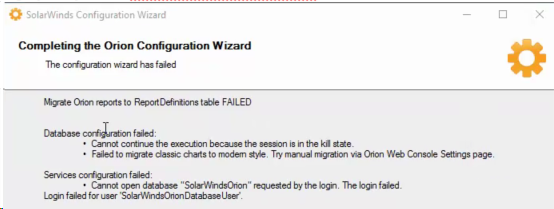
- Errors seen in ConfigurationWizard.log
ERROR DatabaseHelper - Unable to remove data from database for ConfigWizard active instance! Reason: Cannot open database "SolarWindsOrion" requested by the login. The login failed.

Login failed for user 'SolarWindsOrionDatabaseUser'.

System.Data.SqlClient.SqlException (0x80131904): Cannot open database "SolarWindsOrion" requested by the login. The login failed.

Login failed for user 'SolarWindsOrionDatabaseUser'.
Product section
Orion Platform
Cause
Possible connectivity issues between the SolarWinds Platform and SQL server.
Resolution
- Verify the SQL and SolarWinds Platform server connectivity using the UDL file
- If test connection succeeded proceed on rebooting both the SolarWinds Platform and SQL server.
- Make sure the SQL Credentials are correct and have the correct privileges
- Re-run the Configuration Wizard as Administrator
- Restart SolarWinds Platform services if SQL and SolarWinds Platform installed on same server