
Network Management
Calculate interface bandwidth utilization in NPM
How to manually calculate bandwidth utilization within NPM using two SNMP walks from a node.
First published date
11/29/2018 4:31 PM
Last published date
5/11/2026 11:38 PM
Overview
It is sometimes necessary to calculate bandwidth usage with SNMP; for example, to get in-depth details about data displayed in NPM, or to check the validity of the information displayed.
Bandwidth utilization is calculated via SNMP polls. Furthermore, it is calculated using the difference between two timestamps. Therefore, the calculations to manually perform this are considered time-consuming. Before manually calculating the bandwidth utilization, it is recommended that you verify whether the bandwidth utilization for the interface is set to a custom value. Go to the Edit Properties page for the interface, check the page in the Bandwidth section, and verify custom values have not been set.
The image below displays overridden bandwidth values. When you override the bandwidth values, this overrides the SNMP calculations below.
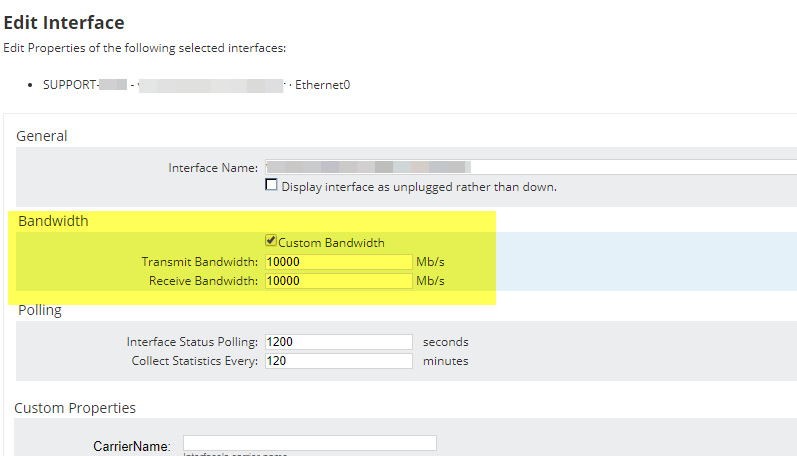
For reference, see Edit interface properties in NPM.
Bandwidth utilization is calculated via SNMP polls. Furthermore, it is calculated using the difference between two timestamps. Therefore, the calculations to manually perform this are considered time-consuming. Before manually calculating the bandwidth utilization, it is recommended that you verify whether the bandwidth utilization for the interface is set to a custom value. Go to the Edit Properties page for the interface, check the page in the Bandwidth section, and verify custom values have not been set.
The image below displays overridden bandwidth values. When you override the bandwidth values, this overrides the SNMP calculations below.
For reference, see Edit interface properties in NPM.
Product section
Network Performance Monitor
Resolution
Steps:
- Get two SNMP walks from the target device and know the time interval between them. For information on how to run SNMP walk see: SolarWinds SNMP Walk: A new tool for collecting SNMP MIB walks in the SolarWinds Platform
- A good starting point is to run the SNMP walks 10 minutes (600 seconds) apart.
- You can also calculate the difference in sysUpTime (1.3.6.1.2.1.1.3) to get the time delta between the two SNMP walks.
- Gather OIDs. Note that 32- and 64-bit counters use different OIDs. For details, see What object IDs (OIDs) does NPM poll for interface information.
- Select a direction (in or out) and use the 32 or 64-bit counters according to the Node setting in NPM (edit node)
- Select an interface to perform the calculation
- The formula we use to calculate the bps: bps = ((poll2 -poll1)*8)/time_in_seconds_between_polls
- Review How to calculate interface bandwidth and utilization. (Note: The following calculations use 32-bit OIDs.)
Example Calculation
- First, find the interface unique ID based on ifName (1.3.6.1.2.1.31.1.1.1.1),
- example:
- .1.3.6.1.2.1.31.1.1.1.1.10 = STRING: “Gigabit Ethernet 1/13“
- Use the .10 above when searching for the ifInOctets OIDs below
- SNMPWalk1:
- ifInOctets = 1.3.6.1.2.1.2.2.1.10.10 = 4061867077
- ifSpeed = 1.3.6.1.2.1.2.2.1.5.10 = 1000000000
- SNMPWalk2:
- ifInOctets = 1.3.6.1.2.1.2.2.1.10.10 = 158003538 (+ 4294967296 due to counter rollover)
- ifSpeed = 1.3.6.1.2.1.2.2.1.5.10 = 1000000000
- Time difference between walks: 793 seconds
- Difference between walk 1 and 2 in ifinoctets:
- (158003538 + 4294967296) - 4061867077 = 391103756
- (158003538 + 4294967296) - 4061867077 = 391103756
391103756 x 8 x 100 = 312883004800
----------------------------------------------------
793 x 1000000000 = 793000000000
- Results = 312883004800 / 793000000000 = 0.3945561220680958
- 0.3945561220680958 x 100 = 39.46% bandwidth IN utilization during the 793 seconds between walks