
Applications Systems
Avoid false-positive antivirus alerts related to Asset Inventory polling in SCM or SAM
Learn how to avoid false-positive alerts during antivirus scans that occur when the Asset Inventory feature uses Microsoft Visual Basic Script (VBScript) to poll for Windows Update details on monitored nodes in SAM and SCM.
First published date
2/25/2021 6:42 PM
Last published date
6/1/2023 9:59 PM
Overview
The Asset Inventory feature in SAM and SCM uses VBScript triggered by WMI calls to gather data about Windows updates on monitored nodes. This can cause false-positive alerts during some antivirus scans. Ports for file and printer sharing (also called “admin shares”) are also opened, which can cause DCOM errors.
This article describes how to adjust Advanced Configuration settings to block VBScript from running on remote systems, if necessary.
Please note that if you disable VBScript polling, the following metrics will appear as Unknown for Windows nodes: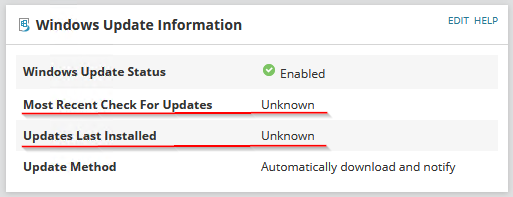
This article describes how to adjust Advanced Configuration settings to block VBScript from running on remote systems, if necessary.
Please note that if you disable VBScript polling, the following metrics will appear as Unknown for Windows nodes:
- Most Recent Check for Updates
- Updates Last Installed
Product section
Server Application Monitor
Cause
The use of VBScript to poll for Windows updates on monitored nodes triggers false positives in some antivirus scans, such as Windows Defender and Bitdefender.
Resolution
Adjust Advanced Configuration settings to disable the ScriptPollingEnabled setting.
- Log into the Orion Web Console with an administrator account.
- Use the Orion Service Manager to stop the SolarWinds Collector service on the Polling Engine.
- Navigate to Advanced Configuration settings at the following IP address:
<your production server>/Orion/Admin/AdvancedConfiguration/Global.aspx - Scroll to the AssetInventory section of the page.
- Clear the ScriptPollingEnabled check box.
- Click Save.
- Restart the SolarWinds Collector service.