
Tools
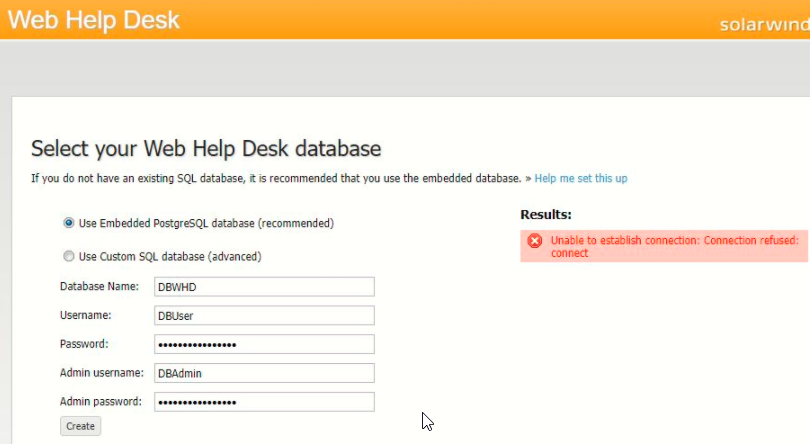
Unable to establish a connection: connection refused
This article describes the resolution for the error "Unable to establish a connection: connection refused" that occurs when creating a Web Help Desk PostgreSQL 13.3 Embedded Database after a fresh WebHelpDesk installation.
First published date
3/13/2022 3:53 PM
Last published date
2/12/2025 1:46 AM
Overview
We have a standard installation in WebHelpDesk which is described as follows:
Install WHD in a stand-alone deployment (solarwinds.com)
WHD 12.8.3 System Requirements
Even after following this, you might encounter the error, "Unable to establish a connection: connection refused" when creating a new Web Help Desk PostgreSQL 13.3 Embedded Database.
Upon checking the list of running Services, you will notice that the Web Help Desk PostgreSQL 13.3 Embedded Database" service was stopped or does not exist.
Install WHD in a stand-alone deployment (solarwinds.com)
WHD 12.8.3 System Requirements
Even after following this, you might encounter the error, "Unable to establish a connection: connection refused" when creating a new Web Help Desk PostgreSQL 13.3 Embedded Database.
Upon checking the list of running Services, you will notice that the Web Help Desk PostgreSQL 13.3 Embedded Database" service was stopped or does not exist.
Product section
Web Help Desk
Cause
- The "Web Help Desk PostgreSQL 13.3 Embedded Database" service is stopped and not running.
- Missing Microsoft Visual C++ 14.28.29914 requirement.
Resolution
Web Help Desk PostgreSQL 13.3 Embedded Database" service is not running.
- Run the Service.msc as an admin.
- Check the status of the Web Help Desk PostgreSQL 13.3 Embedded Database" service.
- If the status is stop, start it, or run the whd_start.bat as an admin from the WHD installation path (C:\Program Files\WebHelpDesk), which will run both the WHD service and PostgreSQL service.
Web Help Desk PostgreSQL 13.3 Embedded Database" service is missing.
- Install the Microsoft Visual C++ 14.28.29914 (KB2999226)
- Ensure that Powershell is version 5.1 and above,
- To check the version, open PowerShell and type in $PSVersionTable
- Restart the service once Microsoft Visual C++ or Powershell was upgraded.
- After reboot, stop the WHD.
- Stop WHD by running the whd_stop.bat as an admin from the WHD installation path (C:\Program Files\WebHelpDesk).
- Rename data folder of C:\Program Files\WebHelpDesk\pgsql13\data to data_old
- Launch CMD as an admin. Navigate to C:\Program Files\WebHelpDesk and run the following command:
-
INSTALL_SERVICES.bat "C:\Program Files\WebHelpDesk"
-- Scripts are not supported under any SolarWinds support program or service.
-- Scripts are provided AS IS without warranty of any kind. SolarWinds further
-- disclaims all warranties including, without limitation, any implied warranties
-- of merchantability or of fitness for a particular purpose. The risk arising
-- out of the use or performance of the scripts and documentation stays with you.
-- In no event shall SolarWinds or anyone else involved in the creation,
-- production, or delivery of the scripts be liable for any damages whatsoever
-- (including, without limitation, damages for loss of business profits, business
-- interruption, loss of business information, or other pecuniary loss) arising
-- out of the use of or inability to use the scripts or documentation.
- Check now in the Services.msc if Web Help Desk PostgreSQL 13.3 Embedded Database" service exists.
- Start WHD by running the whd_start.bat as an admin from the WHD installation path (C:\Program Files\WebHelpDesk) which will run both the WHD service and PostgreSQL service.
- If both WHD and Web Help Desk PostgreSQL 13.3 Embedded Database" services are now running, retry creating the database.