
Network Management
Orion Web Upgrade Failed: An error was encountered while installing updates Some files are used by another process
"An error was encountered while installing updates: Some files are used by another process. Files: SolarWinds Administration Service (Process Id: 2208). SolarWinds.JobEngineWorker.x64.v2 (Process Id: 61940)
First published date
11/13/2019 8:09 PM
Last published date
9/15/2023 1:30 AM
Overview
The SolarWinds Administration service is been used by other applications.
Other services are being hung or have not completely stopped.
The Centralized Upgrade interface provides the following error.
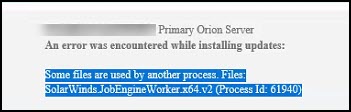
An error was encountered while installing updates:
Some files are used by another process. Files:
SolarWinds Administration Service (Process Id: 2208)
SolarWinds.JobEngineWorker.x64.v2 (Process Id: 61940)
Other services are being hung or have not completely stopped.
The Centralized Upgrade interface provides the following error.
An error was encountered while installing updates:
Some files are used by another process. Files:
SolarWinds Administration Service (Process Id: 2208)
SolarWinds.JobEngineWorker.x64.v2 (Process Id: 61940)
Product section
Orion Platform
Cause
Services are being used by another process or haven't completely stopped.
Resolution
Review the logs to determine what service or process is causing the issue. Once you determine the service or process that's causing the issue, you can use Task Manager to see the status of the service and stop it as needed.
Approach 1 - Kill the process on task manager:
If it is stuck on a SolarWinds Service (E.g. SolarWinds Administration Service or SolarWinds Orion Module Engine), stop it using the Orion Service Manager then start all Orion services to open the Orion Web Console and retry the installation.
Approach 2: Manually upgrade using the SolarWinds Installer from the SolarWinds Customer Portal.
Approach 1 - Kill the process on task manager:
- Open Windows Task Manager
- Under the User Tab - Make sure that there are no other users logged in.
- Under the Details Tab - Find that Process ID and Kill it via End Task
If it is stuck on a SolarWinds Service (E.g. SolarWinds Administration Service or SolarWinds Orion Module Engine), stop it using the Orion Service Manager then start all Orion services to open the Orion Web Console and retry the installation.
Approach 2: Manually upgrade using the SolarWinds Installer from the SolarWinds Customer Portal.
- Log in to your SolarWinds Portal
- Go to tab Downloads > Download a Product > From the drop-down list select any Orion Module (eg. NPM), then download the offline installer. Note that the offline installer has around 5.2GB.
- Place the installer on the Orion Server and perform the installation.
- You may use the following article as a reference: