
Network Management
Unable to Add DHCP Server and Showing that The User Name or Password is Incorrect
This article is created to address the issue about adding a DHCP server that is showing an error that the user name or password is incorrect even though the credentials used is correct
First published date
11/20/2020 4:16 AM
Last published date
2/17/2022 6:52 AM
Overview
When adding a DHCP server in IPAM below error message is shown on the web console even credentials used is correct.
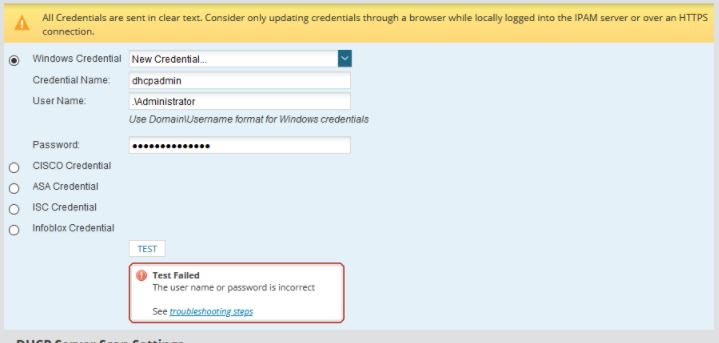
On the SolarWinds.IPAM.Jobs.log, it shows below error message
On the SolarWinds.IPAM.Jobs.log, it shows below error message
[STP SmartThreadPool Thread #0] ERROR SolarWinds.IPAM.Jobs.DhcpWinCredentialTest - Exception while trying to impersonate '.\Administrator'
System.ComponentModel.Win32Exception (0x80004005): The user name or password is incorrect
   at SolarWinds.IPAM.Jobs.Impersonator.ImpersonateValidUser(String userName, String domain, String password)
   at SolarWinds.IPAM.Jobs.Impersonator..ctor(String userName, String password)
   at SolarWinds.IPAM.Jobs.DhcpWinCredentialTest.DoWork(DhcpWinTestJobSettings settings)
Product section
IP Address Manager
Cause
This issue happens when you are using a local account to add a DHCP server where the local account you are using is not present on the Orion Server itself.
Resolution
Ask the server team to create the local account with the same configuration that is present from the DHCP server to the Orion Server.
Example: DHCP server has a local account named DHCPServiceAccount which is a member of DHCPAdministrator. This local account must be present as as well on the Orion Server which is also a member of DHCPAdministrator
Example: DHCP server has a local account named DHCPServiceAccount which is a member of DHCPAdministrator. This local account must be present as as well on the Orion Server which is also a member of DHCPAdministrator