
Tools
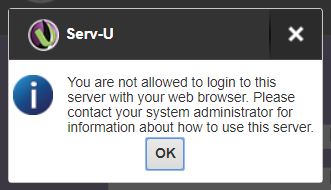
You are not allowed to login to this server with your browser when logging in to Serv-U
Learn how to resolve issue with being denied login access to the server with a browser when logging into Serv-U
First published date
5/10/2019 9:22 PM
Last published date
4/16/2020 12:48 AM
Overview
The notification below appears when logging in to Serv-U web client. It is configuration made to Serv-U and sometimes the customer may overlook. This configuration applied to all level such as Global, Domain, Group, and User.
Product section
Serv-U Managed File Transfer & Serv-U FTP Server
Cause
Allow users to use Web client is disabled in the Serv-U limits and settings
Resolution
- Open Serv-U Console.
- Go to Limits and Settings.
- Select HTTP from the limit type drop-down.
- Make sure that Allow users to use Web client is set to "Yes".
- If not, create a new limit.