
Network Management
Wireless controller access points do not display Network Atlas
This article describes how to troubleshoot wireless controller access points that display on the Wireless Controller in the Orion Web Console but not in the Network Atlas.
First published date
11/7/2018 3:54 PM
Last published date
3/9/2022 5:22 PM
Overview
This article describes how to troubleshoot wireless controller access points (APs) that display in the Orion Web Console under Wireless Controller but not in the Network Atlas.
Product section
Network Performance Monitor
Resolution
- Log in to the Orion Web Console
- Locate the wireless controller with an issue.
- Click List Resources.
- Uncheck the Wireless Controller checkbox and click Submit
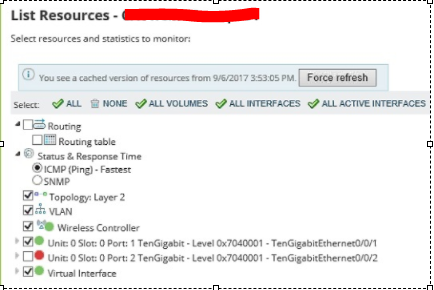
- Wait for 5 minutes (two polling cycles) or click Poll Now.
- Click List Resources.
- Select the Wireless Controller checkbox.
- Click Submit.
- Wait for 5 minutes (two polling cycles) or click Poll Now.
- Verify that the wireless controller access points display in the Network Atlas.
If the steps do not resolve the issue, ask for SNMPWalk and confirm if the controller exposes the APs.
- Locate the wireless controller with an issue.
- Click List Resources.
- Uncheck the Wireless Controller checkbox and click Submit
- Wait for 5 minutes (two polling cycles) or click Poll Now.
- Click List Resources.
- Select the Wireless Controller checkbox.
- Click Submit.
- Wait for 5 minutes (two polling cycles) or click Poll Now.
- Verify that the wireless controller access points display in the Network Atlas.
If the steps do not resolve the issue, ask for SNMPWalk and confirm if the controller exposes the APs.