
Access Rights Manager
Why do permission changes with ARM take so long?
When the Group Wizard for ARM is active, setting permissions can take longer, especially when set for the first time.
First published date
3/2/2020 3:17 PM
Last published date
3/2/2020 3:17 PM
Overview
Example:
This is the configured Group Wizard settings:

Now we set the modify permission for a user on Level 4.
Here’s what the sandbox will show you beforehand:
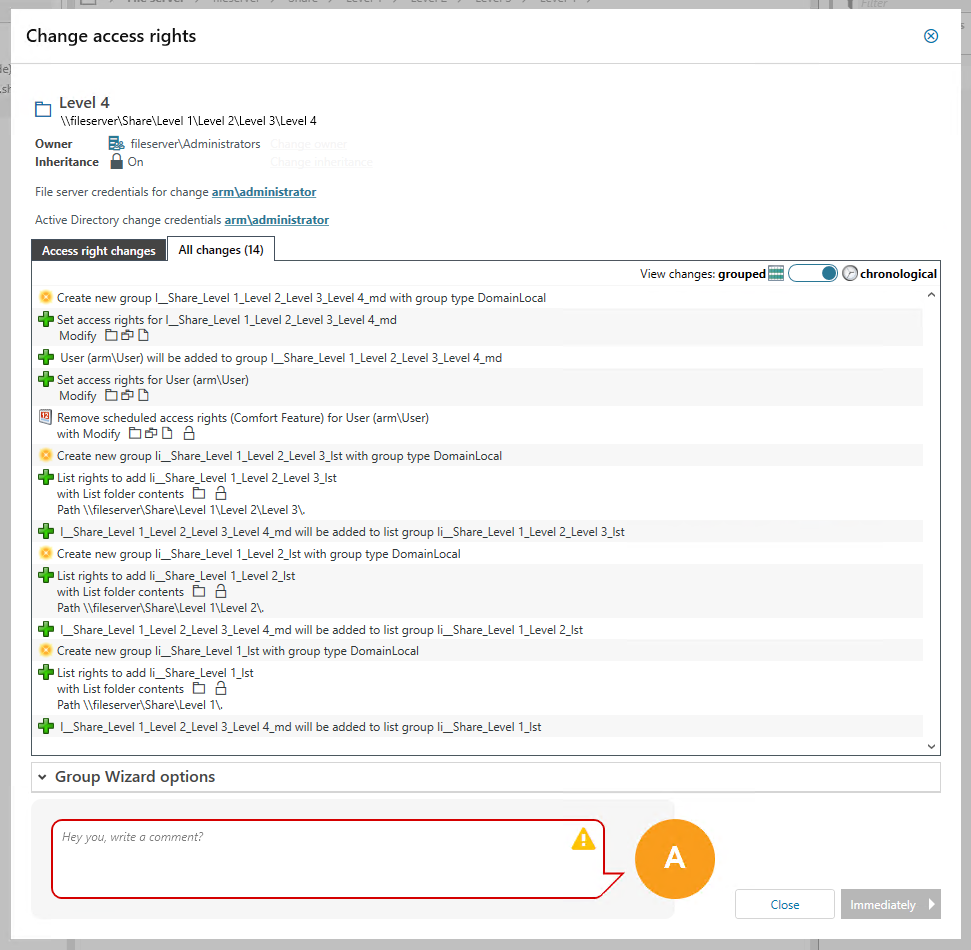
We got 1 change permission group and 3 list groups which will be created in AD and set as access group on the fileserver.
This is the configured Group Wizard settings:
Now we set the modify permission for a user on Level 4.
Here’s what the sandbox will show you beforehand:
We got 1 change permission group and 3 list groups which will be created in AD and set as access group on the fileserver.
- The modify permissions group is set on the folder and ARM waits for the inheritance mechanism to be done.
- Then the first list permission group is set on the parent folder. List groups do have “This folder only” propagation, so when set their permissions won’t get inherited by subfolders. Yet the inheritance mechanism will start since the filesystem detected a change in the ACLARM again wait for the inheritance mechanism to finish.
- This repeats till Level 1 is reached, the first level after the share. This could involve an enormous amount of data, and takes exponentially longer with each level.
- If the comfort feature is active as well, you’ll have to wait one for the direct permission to be set and the inheritance mechanism to be done.
Product section
Access Rights Manager
Cause
List groups do have “This folder only” propagation, so when their permissions are set it won’t get inherited by subfolders.
The filesystem will note the ACL has changed and the inheritance mechanism will be triggered.
The filesystem will note the ACL has changed and the inheritance mechanism will be triggered.
Resolution
This will only take a longer time when an ARM permission or list group will be set for the first time.
Subsequently set permissions will use existing ARM groups and most permisson change will be only group membership changes in the Active Directory.
If the comfort feature is active, this will still have and impact on the duration since directly setting permissions for the user still needs time due to inheritance.
Subsequently set permissions will use existing ARM groups and most permisson change will be only group membership changes in the Active Directory.
If the comfort feature is active, this will still have and impact on the duration since directly setting permissions for the user still needs time due to inheritance.