
Security Compliance
While login to ARM Client receiving error - Connection to server failed. An unexpected error occurred while connecting to the ARM server.
Error during login process in the ARM Client.
First published date
6/17/2020 8:50 AM
Last published date
2/10/2025 12:31 AM
Overview
This article provides solution to the issue which manifests itself by p[resenting below error during login process in the ARM Client.
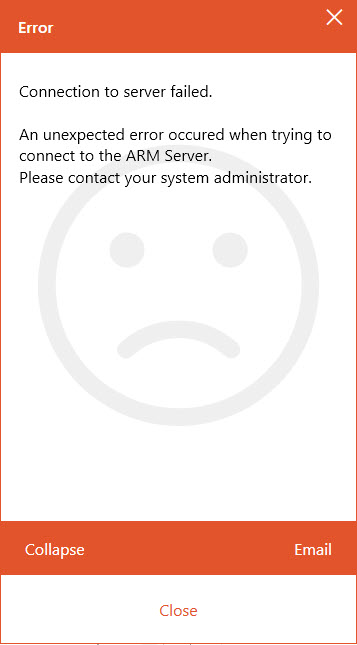
You can also find below records in the ARM Client log file (app8MAN.log):
--- GERMAN ---
[ 325|HOSTNAME |app8Man |11692.1| 1|pn.vampir.ui.logon.LoginWindowViewModel |200609| 5:55:18.285|Info ] LoginWindowViewModel.loginFailed(Exception exception): Login failed, message=Verbindung zum Server ist fehlgeschlagen.
Ein unerwarteter Fehler ist beim Verbindungsaufbau mit dem ARM Server aufgetreten.
Bitte wenden Sie sich an Ihren Systemadministrator.
[..]
[ 336|HOSTNAME |app8Man |11692.1| 20|Job (Login) |200609| 5:56:14.757|Error ] Job.Execute(): System.Net.Sockets.SocketException (0x80004005): Der angegebene Host ist unbekannt
--- ENGLISH ---
[ 325|HOSTNAME ]app8Man [ 11692.1 ]1|pn.vampir.ui.logon.LoginWindowViewModel [ 200609 ]5:55:18.285 [ Info ] LoginWindowViewModel.loginFailed(Exception exception): Login failed, message=Connection to server failed.
An unexpected error occurred while connecting to the ARM server.
Please contact your system administrator.
[..]
[ 336|HOSTNAME |app8Man |11692.1| 20|Job (Login) |200609| 5:56:14.757|Error ] Job.Execute(): System.Net.Sockets.SocketException (0x80004005): The specified host is unknown
Connection to server failed.
An unexpected error occurred while connecting to the ARM server.
Please contact your system administrator.
You can also find below records in the ARM Client log file (app8MAN.log):
--- GERMAN ---
[ 325|HOSTNAME |app8Man |11692.1| 1|pn.vampir.ui.logon.LoginWindowViewModel |200609| 5:55:18.285|Info ] LoginWindowViewModel.loginFailed(Exception exception): Login failed, message=Verbindung zum Server ist fehlgeschlagen.
Ein unerwarteter Fehler ist beim Verbindungsaufbau mit dem ARM Server aufgetreten.
Bitte wenden Sie sich an Ihren Systemadministrator.
[..]
[ 336|HOSTNAME |app8Man |11692.1| 20|Job (Login) |200609| 5:56:14.757|Error ] Job.Execute(): System.Net.Sockets.SocketException (0x80004005): Der angegebene Host ist unbekannt
--- ENGLISH ---
[ 325|HOSTNAME ]app8Man [ 11692.1 ]1|pn.vampir.ui.logon.LoginWindowViewModel [ 200609 ]5:55:18.285 [ Info ] LoginWindowViewModel.loginFailed(Exception exception): Login failed, message=Connection to server failed.
An unexpected error occurred while connecting to the ARM server.
Please contact your system administrator.
[..]
[ 336|HOSTNAME |app8Man |11692.1| 20|Job (Login) |200609| 5:56:14.757|Error ] Job.Execute(): System.Net.Sockets.SocketException (0x80004005): The specified host is unknown
Product section
Access Rights Manager
Cause
Issue is caused by underlying DNS issue which results in the workstation on which ARM Client is installed and attempt to connection is made is not resolvable through DNS. Simple test can be performed using ping or nslookup commands, where HOSTNAME is the name of the workstation:
ping HOSTNAME
nslookup HOSTNAME
Resolution
Please consider to always use the FQDN of the ARM Server in the client options for a correct DNS resolution and certificate verification.
Another possible workaround while system relies on DNS provided by Active Directory is to re-register workstation by submitting below command:
- To solve the issue you may need need to additionally discuss with the DNS Administrator of your network.
- Go to Start > run Notepad.
- Right click on the Notepad icon and select Run as Administrator.
- Select Open from the File menu option.
- Select
All Files (*.*)from the file type drop-down. - Browse to c:\Windows\System32\drivers\etc
- Open the
hostsfile. - Add the host name and IP address to the bottom of the host file. The comments in this file show how to format this entry.
For example:
10.20.30.40 hostname - Save the host file.
Another possible workaround while system relies on DNS provided by Active Directory is to re-register workstation by submitting below command:
ipconfig /registerdns