
Tools
Web help desk Administrator is getting an error java.lang.NullPointerException when clicking on the + or the Edit pencil to change column sets in Ticket Column Sets
This article described when web help desk Administrators get an error java.lang.NullPointerException when clicking on the + or the Edit pencil to change column sets in Ticket Column Sets.
First published date
3/7/2022 8:29 PM
Last published date
6/1/2022 6:39 PM
Overview
Web Help Desk does have a feature to allow the Technicians to view and customize the ticket queue. You can customize your view of the ticket queue by creating one or more column sets. Each column set specifies which columns are displayed and in what order.
However, on this issue, the Column Sets are not working. When the Web Help Desk Administrator/Techs click on the + or the Edit pencil to change column sets, they are a generic error: We’re sorry, an unexpected error occurred. Please contact Administrator
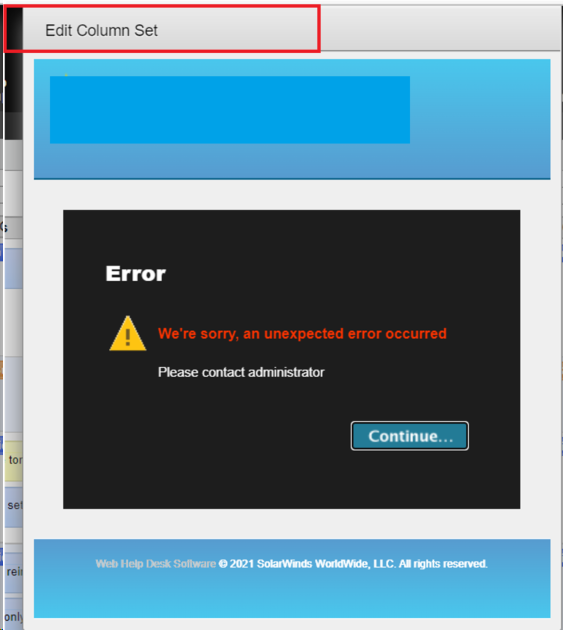
This happens to all tech accounts when trying to create a new view.
From the Logs, we can see the error below:
However, on this issue, the Column Sets are not working. When the Web Help Desk Administrator/Techs click on the + or the Edit pencil to change column sets, they are a generic error: We’re sorry, an unexpected error occurred. Please contact Administrator
This happens to all tech accounts when trying to create a new view.
From the Logs, we can see the error below:
2021-12-16 07:08:00.605 [https-jsse-nio-443-exec-7] ERROR com.macsdesign.whd.ui.Application - Application.handleException(): java.lang.NullPointerException
java.lang.NullPointerException: null
at java.base/java.util.regex.Matcher.getTextLength(Matcher.java:1770)
at java.base/java.util.regex.Matcher.reset(Matcher.java:416)
at java.base/java.util.regex.Matcher.<init>(Matcher.java:253)
at java.base/java.util.regex.Pattern.matcher(Pattern.java:1133)
at com.macsdesign.whd.ui.MDSDynamicBindingsComponent.replaceKeyPathsInStringUsingComponent(MDSDynamicBindingsComponent.java:125)
at com.macsdesign.whd.ui.ColumnSelectorPopupWindow$SelectionItem.selectionLabel(ColumnSelectorPopupWindow.java:571)
at jdk.internal.reflect.GeneratedMethodAccessor2463.invoke(Unknown Source)
at java.base/jdk.internal.reflect.DelegatingMethodAccessorImpl.invoke(DelegatingMethodAccessorImpl.java:43)
at java.base/java.lang.reflect.Method.invoke(Method.java:566)
Product section
Web Help Desk
Cause
There is a NULL value in the 'LABEL' column, table name: CUSTOM_FIELD_DEFINITION
Resolution
1. Access the Web Help Desk Database Server
2. Run the query below to identify which column contains a NULL value in the 'LABEL' column
3. If returns a result, run an update query to fill in the blank in the 'LABEL' column
Legal Disclaimer
Scripts are not supported under any SolarWinds support program or service. Scripts are provided AS IS without warranty of any kind. SolarWinds further disclaims all warranties including, without limitation, any implied warranties of merchantability or of fitness for a particular purpose. The risk arising out of the use or performance of the scripts and documentation stays with you. In no event shall SolarWinds or anyone else involved in the creation, production, or delivery of the scripts be liable for any damages whatsoever (including, without limitation, damages for loss of business profits, business interruption, loss of business information, or other pecuniary loss) arising out of the use of or inability to use the scripts or documentation.
2. Run the query below to identify which column contains a NULL value in the 'LABEL' column
-- Scripts are not supported under any SolarWinds support program or service.
-- Scripts are provided AS IS without warranty of any kind. SolarWinds further
-- disclaims all warranties including, without limitation, any implied warranties
-- of merchantability or of fitness for a particular purpose. The risk arising
-- out of the use or performance of the scripts and documentation stays with you.
-- In no event shall SolarWinds or anyone else involved in the creation,
-- production, or delivery of the scripts be liable for any damages whatsoever
-- (including, without limitation, damages for loss of business profits, business
-- interruption, loss of business information, or other pecuniary loss) arising
-- out of the use of or inability to use the scripts or documentation.


select id, label from custom_field_definition where label is NULL;
3. If returns a result, run an update query to fill in the blank in the 'LABEL' column
-- Scripts are not supported under any SolarWinds support program or service.
-- Scripts are provided AS IS without warranty of any kind. SolarWinds further
-- disclaims all warranties including, without limitation, any implied warranties
-- of merchantability or of fitness for a particular purpose. The risk arising
-- out of the use or performance of the scripts and documentation stays with you.
-- In no event shall SolarWinds or anyone else involved in the creation,
-- production, or delivery of the scripts be liable for any damages whatsoever
-- (including, without limitation, damages for loss of business profits, business
-- interruption, loss of business information, or other pecuniary loss) arising
-- out of the use of or inability to use the scripts or documentation.


update custom_field_definition set label = 'THIS_NEED_A_LABEL' where label is NULL;
4. Restart Web Help Desk ServicesLegal Disclaimer
Scripts are not supported under any SolarWinds support program or service. Scripts are provided AS IS without warranty of any kind. SolarWinds further disclaims all warranties including, without limitation, any implied warranties of merchantability or of fitness for a particular purpose. The risk arising out of the use or performance of the scripts and documentation stays with you. In no event shall SolarWinds or anyone else involved in the creation, production, or delivery of the scripts be liable for any damages whatsoever (including, without limitation, damages for loss of business profits, business interruption, loss of business information, or other pecuniary loss) arising out of the use of or inability to use the scripts or documentation.