
Applications Systems
WPM Domain Accounts Configuration Tool error: Wait for access to mutex has timed out Global/S
Domain Configuration Tool fails with Wait for access to mutex has timed out Global/S when programming WPM domain accounts for single-sign on or Window Authentication purposes.
First published date
8/7/2020 12:41 PM
Last published date
8/7/2020 12:41 PM
Overview
When configuring WPM Domain accounts using the Domain Configuration tool, the user may experience an error such as the following.
Wait for access to mutex has timed out Global/S
This can only occur when there is two or more accounts that are added through the tool. The tool will look for a lock to be acquired for 30 seconds. That means that validation for all accounts has to complete within 30 seconds. Otherwise, it will time out. For single account, it will not wait for lock as there are no concurrent validations.
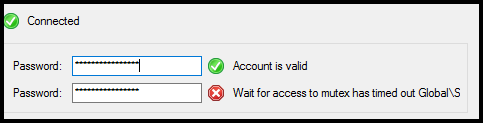
Wait for access to mutex has timed out Global/S
This can only occur when there is two or more accounts that are added through the tool. The tool will look for a lock to be acquired for 30 seconds. That means that validation for all accounts has to complete within 30 seconds. Otherwise, it will time out. For single account, it will not wait for lock as there are no concurrent validations.
Product section
Web Performance Monitor
Cause
The muteX is a feature of .NET, which allows for thread synchronization. Both, in the same process, but also in threads run by other processes run on the server. It is used to prevent the execution of a shared resource by multiple threads.
In WPM, it is used to block the setup of the configuration by the tool if there is at least one process which has enabled mutex with id Global\SEUMAgent {d96caac8-63e0-49b4-b1ab-a6ea6e064819}
running at that time on the server.
In WPM, it is used to block the setup of the configuration by the tool if there is at least one process which has enabled mutex with id Global\SEUMAgent {d96caac8-63e0-49b4-b1ab-a6ea6e064819}
running at that time on the server.
Resolution
Log into the problematic Player location.
- Navigate to
C:\Program Files (x86)\SolarWinds\Orion\SEUM\Player\
- Open:
SolarWinds.SEUM.AgentDomainConfigurationTool.exe.config
- In <configSections> section add line
<section name="agentConfiguration" type="SolarWinds.SEUM.Agent.Common.Configuration.AgentConfiguration, SolarWinds.SEUM.Agent.Common" />
- Below <configSections> add agentConfiguration by adding this line:
<agentConfiguration useLogonUserForCredentialsValidation="true" />
- Save the config file and attempt to configure your domain accounts. Be sure to launch the Domain Configuration Tool as an administrator.