
Applications Systems
WPM transactions fail to play with status error Probe process has failed with exit code 2
All WPM transactions status show error "Probe process has failed with exit code 2" after upgrade to 2023.3 for non-English OS Locales settings that use comma instead of dot as decimal separator.
First published date
8/20/2023 11:49 AM
Last published date
2/21/2025 8:52 PM
Overview
Only customers that have Solarwinds Servers / Player Server Locations OS Language Locale set to non-English and has "comma" as a decimal separator instead of "dot" are running into this issue after upgrading to 2023.3
Following error is noticed in the SEUM player logs.
These parameters are in AgentSettins.dat content where it correctly reads 0.99 as expected.
This means customers Operating System settings > Regional Settings is messing with character encoding used for the separation of floating-point digits.
In this example case, as per System Information logs found in diags point to:
However, even after changing the OS profile to English or Changing the decimal value separator to "dot" instead of "comma" it still behaves, this is because regional settings are applied per user profile and WPM probes run as SEUM-USER-1 ... 7 accounts.
For workaround refer to resolution section below.
Following error is noticed in the SEUM player logs.
SolarWinds.SEUM.PingdomRunner.ProbeProcess - probe.exe: error: argument --imageMatchSimilarityFactor: invalid float value: '0,99'
The WPM probe reading the parameter -imageMatchSimilarityFactor with argument value 0,99 which is incorrect - it should be 0.99. (The same would be with -findElementRetryInterval argument).These parameters are in AgentSettins.dat content where it correctly reads 0.99 as expected.
This means customers Operating System settings > Regional Settings is messing with character encoding used for the separation of floating-point digits.
In this example case, as per System Information logs found in diags point to:
Input Locale: pl;PolishThis means that the language Operating Setting settings could potentially be interfering with the probe arguments format.
However, even after changing the OS profile to English or Changing the decimal value separator to "dot" instead of "comma" it still behaves, this is because regional settings are applied per user profile and WPM probes run as SEUM-USER-1 ... 7 accounts.
For workaround refer to resolution section below.
Product section
Web Performance Monitor
Cause
Bug - WPM Expecting a dot but seeing a comma as decimal separator.
Resolution
Temporary Workaround (Validated):
1. Login Server where WPM player is located with the WPM account example SEUM-USER-1
2. Go to Control panel > Regional Settings > On the Format tab click Additional Settings at the bottom
3. This opens up customize format window, where you can replace comma with dot under Decimal Symbol.
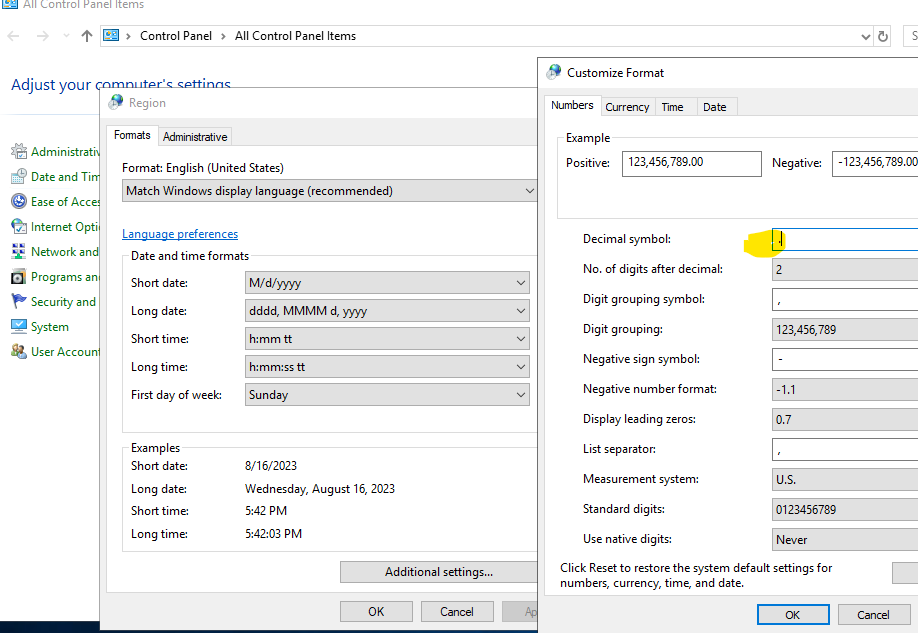
4. Save the changes
5. Repeat these steps for all SEUM-USER accounts that are created on the player server.
6. Signout and Restart the WPM Player Service while logged in with your normal windows account.
For bulk user profile changes you may use this method (not tested use at your own risk)
https://techcommunity.microsoft.com/t5/ask-the-performance-team/how-to-change-regional-settings-for-all-users-on-a-computer/ba-p/375086
Engineering team are preparing a fix for this, do report a CI with Dev for tracking purpose.
1. Login Server where WPM player is located with the WPM account example SEUM-USER-1
2. Go to Control panel > Regional Settings > On the Format tab click Additional Settings at the bottom
3. This opens up customize format window, where you can replace comma with dot under Decimal Symbol.
4. Save the changes
5. Repeat these steps for all SEUM-USER accounts that are created on the player server.
6. Signout and Restart the WPM Player Service while logged in with your normal windows account.
For bulk user profile changes you may use this method (not tested use at your own risk)
https://techcommunity.microsoft.com/t5/ask-the-performance-team/how-to-change-regional-settings-for-all-users-on-a-computer/ba-p/375086
Engineering team are preparing a fix for this, do report a CI with Dev for tracking purpose.