
Applications Systems
High Player Load on WPM Transaction Location
This article discusses a behavior in WPM where a transaction location will display a high Player Load in the web console.
First published date
11/26/2019 5:24 PM
Last published date
6/4/2021 3:26 PM
Overview
WPM Players utilize users to run back transactions. These can either be the local accounts created when the Player is installed, or Active Directory Users if these have been configured. Therefore the product relies on working users to work properly. If these users have issues it can cause a backlog of transactions to play back and therefore increase the Player load value as calculated by the product.
Utilize this article to troubleshoot a high Player load on WPM Player Locations. High Player load can be seen for a variety of reasons. This article discusses step by step how you should react to the situation at hand.
High player load can be found in several locations, one being within the Manage Player menu (Settings > All Settings > WPM Settings > Manage Player Locations).
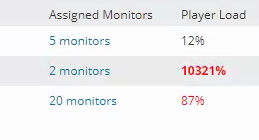
The following message has been seen with Player locations with too many transactions assigned (overloaded). This message will appear on the Transaction Details page:
Message: Object reference not set to an instance of an object.
Also, could appear the following error:
ERROR SolarWinds.SEUM.Agent.WorkerProcessManagement.WorkerProcessLauncher - Error launching worker process.
System.Exception: Error launching worker process. Error: profile load error. System error: 0x490
Utilize this article to troubleshoot a high Player load on WPM Player Locations. High Player load can be seen for a variety of reasons. This article discusses step by step how you should react to the situation at hand.
High player load can be found in several locations, one being within the Manage Player menu (Settings > All Settings > WPM Settings > Manage Player Locations).
The following message has been seen with Player locations with too many transactions assigned (overloaded). This message will appear on the Transaction Details page:
Message: Object reference not set to an instance of an object.
Also, could appear the following error:
ERROR SolarWinds.SEUM.Agent.WorkerProcessManagement.WorkerProcessLauncher - Error launching worker process.
System.Exception: Error launching worker process. Error: profile load error. System error: 0x490
Product section
Web Performance Monitor
Cause
- Player location is the Orion server
- Overloaded Player
- Corrupted Profile
- Insufficient user rights
- Insufficient users for the number of transactions
Resolution
If the affected server is the main Orion server, please be aware that the default number of users is only two for this server. You may increase the number of users if desired, but this is against SolarWinds recommendation. It is recommended to have designated Player locations that are NOT the main Orion server. The main Orion server already performs more tasks than any other server, including alerting and hosting the Orion website.
Check the number of transactions assigned to the Player location. If the number is high and the users is set to 7 or higher, consider a new Player location to offload some polling. Consult the scalability guidelines for the number of transactions supported per Player location.
Stop the WPM Player service and delete the Temp and SEUM profiles, after that restart the WPM Player service.
Verify that the user is a local administrator and is not blocked from login. This is useful in determining if this is the cause and how to correct this issue - High Player Load on Player Location and Transactions Not Playing
If there are a large number of transactions assigned to the Player, this could be backing up the transactions used in playback. Ensure you have a reasonable number of transactions assigned to the Player. This is verified here: Settings > All Settings > WPM Settings > Manage Player Locations > number of monitors is listed in the chart. If the Player is a remote server and not the Orion server, and the number of transactions is a reasonable number, then try Increasing WPM worker processes for high player load.
Check the number of transactions assigned to the Player location. If the number is high and the users is set to 7 or higher, consider a new Player location to offload some polling. Consult the scalability guidelines for the number of transactions supported per Player location.
Stop the WPM Player service and delete the Temp and SEUM profiles, after that restart the WPM Player service.
Verify that the user is a local administrator and is not blocked from login. This is useful in determining if this is the cause and how to correct this issue - High Player Load on Player Location and Transactions Not Playing
If there are a large number of transactions assigned to the Player, this could be backing up the transactions used in playback. Ensure you have a reasonable number of transactions assigned to the Player. This is verified here: Settings > All Settings > WPM Settings > Manage Player Locations > number of monitors is listed in the chart. If the Player is a remote server and not the Orion server, and the number of transactions is a reasonable number, then try Increasing WPM worker processes for high player load.