
Network Management
Validate HA pool Virtual Host Name in Orion
This information will allow you to validate if the VHN for HA pool is created within the DNS server domain
First published date
11/11/2020 9:51 AM
Last published date
7/12/2022 5:50 PM
Overview
This article will suggest a way of validating if the Virtual Host Name (VHN) used for the Orion HA pool exists within a specified DNS domain. Be aware that while creating the pool and configuring VHN it may take some time for DNS to update or create the relevant record and propagate across the network.
Product section
Orion Platform
Resolution
On the Web Console, go to Settings > My Orion Deployment. Select the pool, and on the right-hand side, click on the COMMANDS drop-down and select Edit Pool. Take note of the Virtual Host Name.
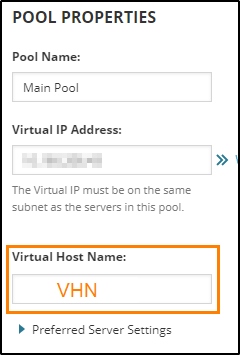
Connect remotely (RDP™) to the DNS server configured under the HA pool settings and run the below PowerShell™ command (you can omit comments marked with #):
NOTE:
Connect remotely (RDP™) to the DNS server configured under the HA pool settings and run the below PowerShell™ command (you can omit comments marked with #):
# Scripts are not supported under any SolarWinds support program or service.
# Scripts are provided AS IS without warranty of any kind. SolarWinds further
# disclaims all warranties including, without limitation, any implied warranties
# of merchantability or of fitness for a particular purpose. The risk arising
# out of the use or performance of the scripts and documentation stays with you.
# In no event shall SolarWinds or anyone else involved in the creation,
# production, or delivery of the scripts be liable for any damages whatsoever
# (including, without limitation, damages for loss of business profits, business
# interruption, loss of business information, or other pecuniary loss) arising
# out of the use of or inability to use the scripts or documentation.

Get-DnsServerResourceRecord -ZoneName "ZONE" -Name "VHN"
NOTE:
- replace ZONE with your DNS domain name
- replace VHN with the HA Virtual Host Name