
Network Management
Use SolarWinds Platform Report Manager to display data during business hours
The SolarWinds Platform Report Manager can build reports that display data filtered during business hours only.
First published date
10/18/2018 11:05 AM
Last published date
4/14/2025 11:54 PM
Overview
Use the Report Manager to filter data in web-based reports during business hours only.
NOTE: Only objects with historical data have timestamp you can use to filter data in advanced selector.
Product section
Network Performance Monitor
Cause
N/A
Resolution
Click Reports > All Reports > Manage Reports > Create New Report
On the Layout Builder panel, click Add Content and choose Custom Table. You may be prompted to add content as soon as you click Create New Report.
On the Add Content section, click Advanced Selector and add the logic shown in the image below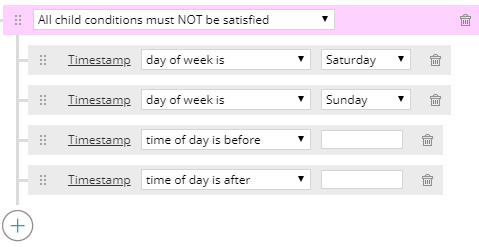
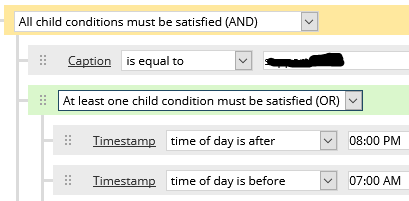
If you need to create a report for business hours at a location other than the time zone of the primary polling engine, and during a time frame that spans midnight, you will add an and/or block, set it to OR, then put the time restrictions of before and after in the or block:
Finish the rest of the report configuration.
On the Layout Builder panel, click Add Content and choose Custom Table. You may be prompted to add content as soon as you click Create New Report.
On the Add Content section, click Advanced Selector and add the logic shown in the image below
- Choose the Timestamp for the appropriate category(e.g. Response Time History, CPU / Memory History, Interface Availability History, etc.)
- Specify the time of day before the start and after the end of the business day
If you need to create a report for business hours at a location other than the time zone of the primary polling engine, and during a time frame that spans midnight, you will add an and/or block, set it to OR, then put the time restrictions of before and after in the or block:
Finish the rest of the report configuration.
See also:
- The Business hours reporting in the web-based Report Writer post on THWACK on how to create custom SQL queries to use in reports to filter for business hours.
- The Manage Reports in the Orion Web Console article for more information on web-based reports.
- The Orion Report writer business hours article on how to create a business hours report using the legacy Orion Report Writer tool.