
Network Management
Upgrade Fail - Failed: Custom Action Log: The operation completed successfully
This article covers the error encountered during the centralized upgrade then switch to manual process of upgrade.
First published date
4/26/2020 3:42 AM
Last published date
8/19/2021 12:57 PM
Overview
The manual process of upgrade this error may show:
- Failed: Custom Action Log: The operation completed successfully
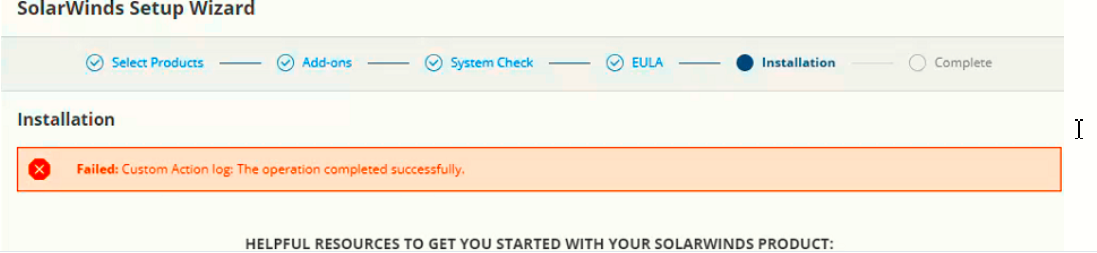
Check the AdministrationService.Client log for this sample error:
- Failed: Custom Action Log: The operation completed successfully
Check the AdministrationService.Client log for this sample error:
2020-04-25 22:45:50,287 [26] ERROR (null) SolarWinds.Administration.InstallExecutor.InstallMessages.InstallMessageNotifier - Install Message|{"Message":"Exception while installing /solarwinds/CatalogResources/NetworkAtlas/1.20/1.20.0.394/SolarWinds-Orion-NetworkAtlas.msi","EventType":"Error","ExecutorType":"MsiExecutor","Arguments":null}
2020-04-25 22:45:50,289 [26] DEBUG (null) SolarWinds.Administration.InstallExecutor.InstallationManager - error message received from MsiExecutor
2020-04-25 22:45:50,291 [26] ERROR (null) SolarWinds.Administration.InstallExecutor.InstallMessages.InstallMessageNotifier - Exception while installing /solarwinds/CatalogResources/NetworkAtlas/1.20/1.20.0.394/SolarWinds-Orion-NetworkAtlas.msi
2020-04-25 22:45:50,294 [26] ERROR (null) SolarWinds.Administration.InstallExecutor.InstallMessages.InstallMessageProcessor - MsiMessage: Custom Action log: The operation completed successfully.
Product section
Network Performance Monitor
Cause
- SWA Service got updated and need to be restarted (2019.4 HF7)
Resolution
During upgrade from NAM 2019.2 to 2019.4 using NAM offline installer on MPE
Restarting the SWA on the server installation is being carried out fixed the issue.
If that does not help
1) Check the AdministrationService.Client for any application that causing the issue
2) Open the Control Panel then the Programs and Features
3) Find the application re-install
Restarting the SWA on the server installation is being carried out fixed the issue.
If that does not help
1) Check the AdministrationService.Client for any application that causing the issue
2) Open the Control Panel then the Programs and Features
3) Find the application re-install