
Applications Systems
Update Global Catalog port settings in AppInsight for Active Directory templates when upgrading SAM
Starting in SAM 2019.4, AppInsight for Active Directory can display Active Directory trust data for domain controllers configured as Global Catalog (GC) servers via port 3268. If upgrading from an earlier version of SAM and your GC servers use port 3269 instead, update that setting in your existing AppInsight for Active Directory template and any assigned application monitors based on that template.
First published date
5/23/2019 8:39 PM
Last published date
11/5/2019 2:16 PM
Overview
The AppInsight for Active Directory template was updated in SAM 2019.4 to use 3268 as the default port to gather trust data from domain controllers configured as Global Catalog (GC) servers. If you upgraded from an earlier version of SAM and your GC servers use port 3269, update that setting in your existing AppInsight for Active Directory template and any assigned application monitors based on that template.
Product section
Server Application Monitor
Resolution
If you upgraded from an earlier version of SAM and your GC servers use port 3269, update that setting in your existing AppInsight for Active Directory template and any assigned application monitors based on that template.
To edit an AppInsight for Active Directory application monitor: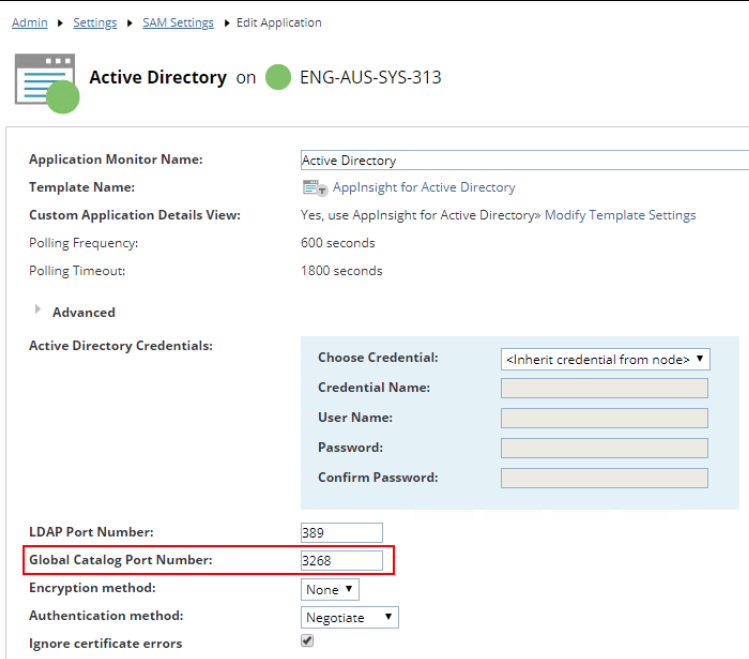
To edit an AppInsight for Active Directory application monitor:
- In the Orion Web Console, click Settings > All Settings.
- In the Product Specific Settings group, click SAM Settings.
- In the Application Monitors group, click Manage Application Monitors.
- On the Manage Assigned Application Monitors page, select the application monitor and click Edit Properties.
- Expand the Advanced section of the page.
- Change the Global Catalog Port Number.
- Click Submit.