
Network Management
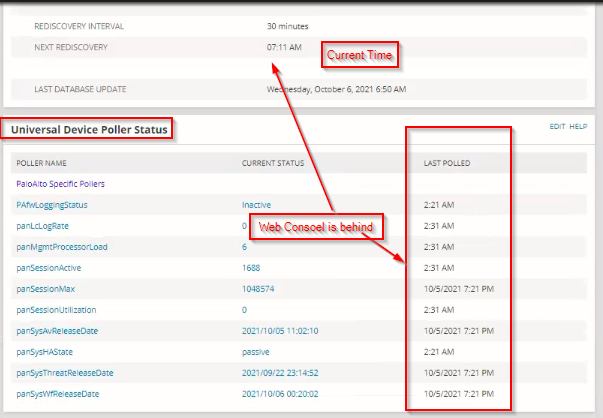
Universal Device Poller Status ( UnDP ) widget data is lagging behind
Entities polled via UnDP pollers assigned to one of the APE's are not showing upto date information on the UNDP poller resource.
First published date
10/10/2021 6:59 AM
Last published date
9/7/2023 12:04 AM
Overview
This article helps address an issue where entities polled via UnDP poller(s) assigned to nodes on one or more APEs are not showing up-to-date polled data on the UnDP poller widget on the node details page.
Note: This KB only applies to NPM 2020.2.6 or higher and is not applicable to earlier.
Note: This KB only applies to NPM 2020.2.6 or higher and is not applicable to earlier.
Product section
Network Performance Monitor
Cause
UnDP Polling Load
Resolution
On the problematic SolarWinds Server:
If the above solution does not apply to you then it could be performance on Undp/Collector jobs.
To address the issue change how UnDP data is collected
1. Go to Advanced Configuration settings. See Access the Advanced Configuration settings in the Orion Web Console.
2. Search for the CustomCollectionKey > tick (enable) option.
3. Save changes.
4. Wait for next UnDP polling cycle to finish and validate if the UnDP polled data is upto date.
- Stop SolarWinds Collector service via Orion Service Manager.
- Open File Explorer and navigate to C:\ProgramData\SolarWinds\Collector\Queues.
- Delete the problematic queue - the file is named NPM.Node.UnDP.SNMP.db.
- Start the SolarWinds Collector service. It will recreate the queue automatically.
- Wait for 5-15 minutes for polling to complete and check the Web Console page again.
If the above solution does not apply to you then it could be performance on Undp/Collector jobs.
To address the issue change how UnDP data is collected
1. Go to Advanced Configuration settings. See Access the Advanced Configuration settings in the Orion Web Console.
2. Search for the CustomCollectionKey > tick (enable) option.
3. Save changes.
4. Wait for next UnDP polling cycle to finish and validate if the UnDP polled data is upto date.