
Network Management
Unable to access the Orion Web Console with Chrome or Firefox
Orion Web Console is not accessible through Chrome or Firefox but works through Internet Explorer 11.
First published date
1/19/2021 3:47 PM
Last published date
2/26/2025 2:46 AM
Overview
When accessing the Orion Web Console using Internet Explorer 11, the console loads correctly as expected. When using Chrome or Firefox, the console shows the error outlined in the screenshot below (ERR_CONNECTION_RESET):
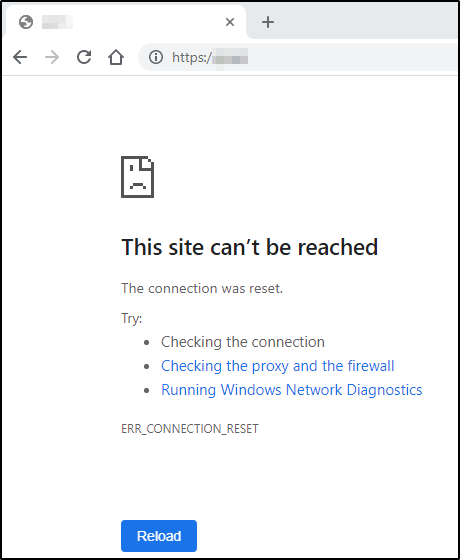
(Screenshots property of © 2021 Google)
(Screenshots property of © 2021 Google)
Product section
Orion Platform
Cause
TLS 1.3 was enabled on the Orion server which is not currently supported by Orion Platform.
Internet Explorer 11 does not currently support TLS 1.3 and fell back to TLS 1.2 instead.
Internet Explorer 11 does not currently support TLS 1.3 and fell back to TLS 1.2 instead.
Resolution
To resolve this issue you should disable TLS 1.3 on the Orion server
You should now be able to access the Orion Web Console using Chrome and Firefox.
More information on adding, modifying and deleting registry values is available here:
https://support.microsoft.com/en-us/help/310516/how-to-add-modify-or-delete-registry-subkeys-and-values-by-using-a-reg (© 2021 Microsoft, Inc., available at https://www.microsoft.com/ , obtained on January 19, 2021)
- Backup the Registry before proceeding.
- Edit the Registry using RegEdit
- Locate the following registry key:
HKEY_LOCAL_MACHINE\SYSTEM\CurrentControlSet\Control\SecurityProviders\SCHANNEL\Protocols\TLS 1.3\Server
- Set:
Enabled = 0
DisabledByDefault = 1
- Locate
HKEY_LOCAL_MACHINE\SYSTEM\CurrentControlSet\Control\SecurityProviders\SCHANNEL\Protocols\TLS 1.3\Client
- Set:
Enabled = 0
DisabledByDefault = 1
- Reboot the Orion server for the settings to take effect.
You should now be able to access the Orion Web Console using Chrome and Firefox.
More information on adding, modifying and deleting registry values is available here:
https://support.microsoft.com/en-us/help/310516/how-to-add-modify-or-delete-registry-subkeys-and-values-by-using-a-reg (© 2021 Microsoft, Inc., available at https://www.microsoft.com/ , obtained on January 19, 2021)