
Tools
Unable to install Web Help Desk (WHD) v12.7.11 on a Windows Server 2022
This article is about an issue during installation of WHD v12.7.11 on a Windows Server 2022 OS
First published date
3/6/2023 3:22 AM
Last published date
2/11/2025 8:21 PM
Overview
There is a requirement to create environment variable prior to installing WHD v12.7.11 on a Windows Server 2022 OS.
Failure to do so will encounter this error and installation will not proceed:
Fatal Application Errror
This Application has Unexpectedly Quit
Invocation of this Java Application has caused an InvocationTargetException. This application will now exit.
––––––––––––––––
Details:
Flexeraaxf$aaa: Windows DLL failed to load
at Flexeraaxf.af(Unknown Source)
at Flexeraaxf.aa(Unknown Source)
at com.zerog.ia.installer.LifeCycleManager.init(Unknown Source)
at com.zerog.ia.installer.LifeCycleManager.executeApplication(Unknown Source)
at com.zerog.ia.installer.Main.main(Unknown Source)
at java.base/jdk.internal.reflect.NativeMethodAccessorImpl.invoke0(Native Method)
at java.base/jdk.internal.reflect.NativeMethodAccessorImpl.invoke(NativeMethodAccessorImpl.java:62)
at java.base/jdk.internal.reflect.DelegatingMethodAccessorImpl.invoke(DelegatingMethodAccessorImpl.java:43)
at java.base/java.lang.reflect.Method.invoke(Method.java:566)
at com.zerog.lax.LAX.launch(Unknown Source)
at com.zerog.lax.LAX.main(Unknown Source)
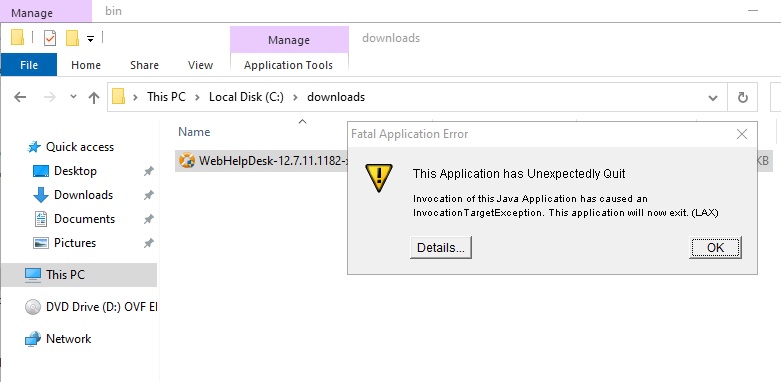
Failure to do so will encounter this error and installation will not proceed:
This Application has Unexpectedly Quit
Invocation of this Java Application has caused an InvocationTargetException. This application will now exit.
––––––––––––––––
Details:
Flexeraaxf$aaa: Windows DLL failed to load
at Flexeraaxf.af(Unknown Source)
at Flexeraaxf.aa(Unknown Source)
at com.zerog.ia.installer.LifeCycleManager.init(Unknown Source)
at com.zerog.ia.installer.LifeCycleManager.executeApplication(Unknown Source)
at com.zerog.ia.installer.Main.main(Unknown Source)
at java.base/jdk.internal.reflect.NativeMethodAccessorImpl.invoke0(Native Method)
at java.base/jdk.internal.reflect.NativeMethodAccessorImpl.invoke(NativeMethodAccessorImpl.java:62)
at java.base/jdk.internal.reflect.DelegatingMethodAccessorImpl.invoke(DelegatingMethodAccessorImpl.java:43)
at java.base/java.lang.reflect.Method.invoke(Method.java:566)
at com.zerog.lax.LAX.launch(Unknown Source)
at com.zerog.lax.LAX.main(Unknown Source)
Product section
Web Help Desk
Cause
System variable for JAVA_TOOL_OPTIONS not present.
Resolution
Create or modify environment variables on Windows Server 2022.
Note: No need to reboot the server.
- On the Windows taskbar, right-click the Windows icon and select System.
- Under Related Settings, click Advanced system settings.
- From the Advanced tab, click Environment Variables
- Under System Variables, click New
- Create new environment variable:
Variable name: JAVA_TOOL_OPTIONS
Variable value: "-Dos.name=Windows Server 2019"
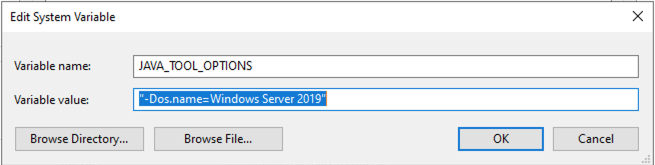
Variable value: "-Dos.name=Windows Server 2019"
- Click OK > OK to save.
Note: No need to reboot the server.