
Network Management
Unable to expand the All Groups widget in the Orion Web Console
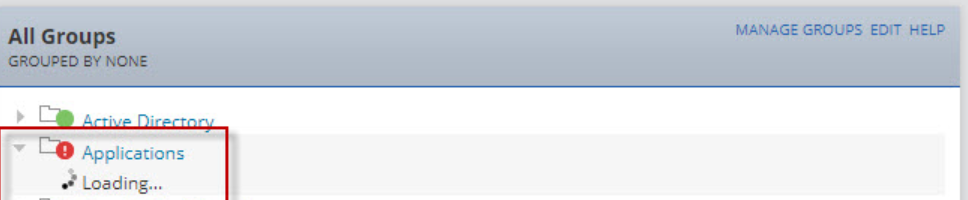
This article discusses how to resolve issue when web users are unable to expand objects in the All Groups widget when it shows Loading... forever.
First published date
1/4/2021 5:00 PM
Last published date
10/20/2025 5:33 PM
Overview
This addresses issues web users have when accessing the All Groups resource and provide just the "loading.." information.
From the SolarWinds Information Service logs at C:\ProgramData\SolarWinds\InformationService\v3.0\Orion.InformationService.log, you should see Long running query errors pertaining to groups similar to the example below:
From the SolarWinds Information Service logs at C:\ProgramData\SolarWinds\InformationService\v3.0\Orion.InformationService.log, you should see Long running query errors pertaining to groups similar to the example below:
ERROR SolarWinds.InformationService.Core.InformationService - w3wp| /LM/W3SVC/2/ROOT-1-132526051962606381| SolarWinds.Orion.Web.DAL.ContainersTreeDAL.GetContainerMembersNodes()| /Orion/Services/ContainersTree.asmx/GetContainerNodes (null) Exception running query:
Select
m2.ID as ID,
m2.Name as Name,
m2.Entity as Entity,
m2.Status as Status,
m2.AncestorNames as AncestorNames,
m2.AncestorUrls as AncestorUrls,
m2.IsExpandable as IsExpandable,
m2.PlainName as PlainName,
m2.MyContainerID as MyContainerID,
me.StatusIconHint,
m2.InstanceSiteId
FROM (SELECT DISTINCT CONCAT(m.MemberEntityType, '-', ToString(m.MemberPrimaryID), '-server-', ToString(m.InstanceSiteId)) AS ID,
m.DisplayName AS Name,
m.MemberEntityType AS Entity,
m.Status AS Status,
m.MemberAncestorDisplayNames AS AncestorNames,
m.MemberAncestorDetailsUrls AS AncestorUrls,
1 AS IsExpandable,
m.DisplayName AS PlainName,
m.MemberPrimaryID AS MyContainerID,
m.MemberUri as MemberUri,
m.InstanceSiteId as InstanceSiteId
FROM Orion.ContainerMembers m Where m.MemberEntityType = 'Orion.Groups' AND m.ContainerID = 139 AND m.InstanceSiteId = 0) AS m2
INNER JOIN (Select Uri,StatusIconHint,InstanceSiteId FROM System.ManagedEntity Where InstanceType = 'Orion.Groups') AS me
ON m2.MemberUri = me.Uri Order By PlainName RETURN XML RAW
There is another scenario where the error above does not display.
Product section
Orion Platform
Cause
Possible Causes:
- Invalid/non-existent entries in the ContainerMemberSnapshots/LimitationSnapshots table.
- Bad entries for the server name in the ContainerMemberDefinitions table
- Invalid DPA Integration settings
- Additional web server
Resolution
Resolution 1
- Stop all services using the Orion Service Manager (Default location: C:\Program Files (x86)\SolarWinds\Orion\StopNetPerfMon.exe for 2020.2.6 and older, C:\Program Files\SolarWinds\Orion\StopNetPerfMon.exe for 2022.3 and newer) on all Orion servers
- Open the Database Manager (Default Location: C:\Program Files (x86)\SolarWinds\Orion\DatabaseManager.exe for 2020.2.6 and older, C:\Program Files\SolarWinds\Orion\DatabaseManager.exe for 2022.3 and newer)
- Select Add Orion Server then expand the SQL server and SolarWinds database in bold.
- Right-click and select New Query.
- Paste and Execute the following query:
-- Scripts are not supported under any SolarWinds support program or service.
-- Scripts are provided AS IS without warranty of any kind. SolarWinds further
-- disclaims all warranties including, without limitation, any implied warranties
-- of merchantability or of fitness for a particular purpose. The risk arising
-- out of the use or performance of the scripts and documentation stays with you.
-- In no event shall SolarWinds or anyone else involved in the creation,
-- production, or delivery of the scripts be liable for any damages whatsoever
-- (including, without limitation, damages for loss of business profits, business
-- interruption, loss of business information, or other pecuniary loss) arising
-- out of the use of or inability to use the scripts or documentation.

DELETE FROM [LimitationSnapShots]
DELETE FROM [ContainerMemberSnapshots]
- Start all services using the Orion Service Manager on all Orion servers starting from Main Poller.
If the steps above do not fix the issue, check the ContainerMemberDefinitions table of the database and make sure it references the Current Orion server. If it does not, use the query below to update the values in the table.
- Open Orion Service Manager on the Orion server.
- Stop the SolarWinds Information Service.
- Ensure there is a recent backup of the Orion database.
- Run the following query in SQL Management Studio or database manager:
UPDATE [ContainerMemberDefinitions] SET Definition = REPLACE(Definition, '<old_server>', '<new_server>')
- Start the Solarwinds Information Service.
Resolution 2
Remove any servers listed on the DPA Integration page of the Orion Web Console:- Log in to the Orion Web Console and go to Settings > All Settings > Database Performance Analyzer.
- Select 'Manage DPA Servers'.
- This page will list your DPA servers. Select any DPA servers listed and select Remove.
- Test the All Groups Widget - this should now load the groups as expected.