
Network Management
JavaScript Error prompting when adding/editing nodes in the SolarWinds Platform
The article discusses different steps to possibly address the issue when an error about JavaScript appears while adding/editing a node in the SolarWinds Platform Web Console.
First published date
9/18/2019 1:14 AM
Last published date
9/8/2025 4:47 PM
Overview
When adding or editing properties on a node inside the Web GUI, the error appears when trying to apply and submit the changes,
Sample Image:
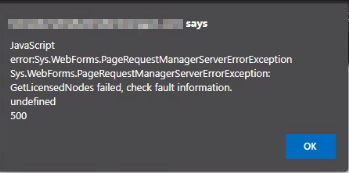
NOTE: this happens either when adding, editing, or testing the credentials inside the edit properties page of the Node
Upon checking the SWISv3 logs, you will see similar errors like the one below: (C:\ProgramData\SolarWinds\InformationService\v3.0\Orion.InformationService.log)
- OR -
- OR -
The following error is recorded in the Business Layer log:
(C:ProgramData\SolarWinds\Logs\Orion\BusinessLayerHost(null).log)
"JavaScript Error: Sys.WebForms.PageRequestManagerServerErrorException Sys.WebForms.PageRequestManagerServerErrorException:
RunQuery failed, check fault information. Unknown provider OLD undefined 500"
Sample Image:
NOTE: this happens either when adding, editing, or testing the credentials inside the edit properties page of the Node
Upon checking the SWISv3 logs, you will see similar errors like the one below: (C:\ProgramData\SolarWinds\InformationService\v3.0\Orion.InformationService.log)
ERROR Orion_OLM_Controls_OLMManagementPlugin - (null)  Error getting management task for OLM module.
System.ServiceModel.FaultException`1[SolarWinds.InformationService.Contract2.InfoServiceFaultContract]: RunQuery failed, check fault information.
Unknown provider OLM. (Fault Detail is equal to InfoServiceFaultContract [ SolarWinds.Data.Query.QueryExecutionException: Unknown provider OLM.
   at SolarWinds.Data.Query.LogicalQueryPlan.PassThroughEvaluator.IdentifyDataProviders(IDataProviderCatalog catalog, PreProcessorState queryState, SelectStatement selectStatement)
   at SolarWinds.Data.Query.LogicalQueryPlan.PassThroughEvaluator.CanExecuteUsingPassThrough(IDataProviderCatalog catalog, PreProcessorState queryState, SelectStatement selectStatement)
   at SolarWinds.Data.Query.Processor.WhereClausePushdown.Visit(SelectStatement statement)
   at SolarWinds.Data.Query.Swql.ParseTreeDuplicator.Visit(SourceExpression source)
   at SolarWinds.Data.Query.Processor.WhereClausePushdown.Visit(SourceExpression source)
   at SolarWinds.Data.Query.Swql.ParseTreeDuplicatorNoState.Visit(FromClause from)
   at SolarWinds.Data.Query.Swql.ParseTreeDuplicatorNoState.Visit(SelectStatement statement)
   at SolarWinds.Data.Query.Processor.WhereClausePushdown.Visit(SelectStatement statement)
   at SolarWinds.D...).
2019-09-10 23:58:35,758 [11] (29) ERROR SolarWinds.Orion.Web.InformationService.InformationServiceProxy - (null)  Object reference not set to an instance of an object.
- OR -
ERROR SolarWinds.InformationService.Core.InformationService - (null) (null)	 Exception caught in method SolarWinds.InformationService.Core.InformationService.RunQuery
System.Data.SqlClient.SqlException (0x80131904): Cannot open database "SolarWindsOrionLog" requested by the login. The login failed.
Login failed for user 'swnpm01a'.
- OR -
The following error is recorded in the Business Layer log:
(C:ProgramData\SolarWinds\Logs\Orion\BusinessLayerHost(null).log)
ERROR SolarWinds.Orion.Core.Common.CoreErrorHandler - Error occured on Business Layer call. Type: System.Data.SqlClient.SqlException
Errors: 'System.Data.SqlClient.SqlErrorCollection'
ClientConnectionId: '5089ec60-8678-4327-8dc0-bc3f00f7c877'
Class: '16'
LineNumber: '1'
Number: '207'
Procedure: ''
Server: 'WebServer1'
State: '1'
Source: '.Net SqlClient Data Provider'
ErrorCode: '-2146232060'
Message: 'Invalid column name 'IsServer'.
Invalid column name 'CustomStatus'.'
Data: 'System.Collections.ListDictionaryIn
Product section
Orion Platform
Cause
It could happen for a multitude of reasons:
- When the virtual memory allocated for the default application pool on a SolarWinds Platform server is limited, the SolarWinds Platform Web Console shows the error
- Connection to the database has been severed due to this, changes applied could not be updated
- The maximum worker process must be changed to 1 in the application pool.
- Corrupted serviceDirectory.json file.
- The contents of the CustomPropertyMetaData table is no longer valid.
Resolution
Resolution 1
If there are timeouts on Information Service, check the proper log.
Resolution 2
Resolution 3
Use a different browser (Internet Explorer, Edge, Mozilla Firefox, etc.
Resolution 4
Ensure database connection on all related databases could be established; you can check using.
Resolution 5
- Open Internet Information Services Manager.
- Navigate to the Application Pool properties of your SolarWinds Platform server.
- Set the Maximum number of worker processes of the default application pool to 1.
Resolution 6
- Stop all services including the SolarWinds Administration service (it's important).
- Delete serviceDirectory.json file from C:\ProgramData\Solarwinds\Orion\ .
- Start everything back including SolarWinds Administration service.
- Wait for ~5 minutes, when everything starts, this JSON file gets recreated.
- Do iisreset under local admin in command prompt or from Run:
- To restart IIS: Click Start, click Run type IISReset, and then click OK.
Resolution 7
- Add a Node Custom Property using the steps in Create a custom property in SAM.
- Delete the custom property created in Step 1.
The error should no longer appear while adding or editing nodes.
Resolution 8
- Repair the SolarWinds Platform. See Repair SolarWinds Platform services for details.
- Re-run and complete the SolarWinds Platform Configuration Wizard.