
Tools
Unable to backup Aruba CX switch with Kiwi CatTools
This article shows how to resolve an issue where Kiwi CatTools is unable to backup an Aruba CX switch device
First published date
9/30/2020 8:19 PM
Last published date
9/19/2022 8:35 PM
Overview
When running a Device.Backup.Running.Config activity in CatTools using the Cisco.Switch.IOS device type, it fails to complete.
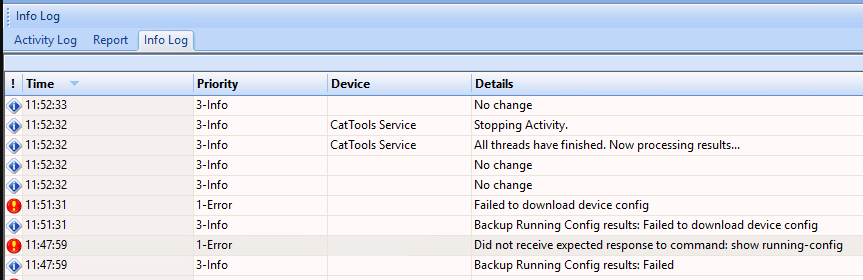
The Activity log may show the following entries:
Waiting for an echo of term no mon command
Waiting for an echo of terminal len 0 command
Waiting for an echo of show running command
After a moment, CatTools will show the 'Failed to download device config" error.
Reviewing the debug logs, the entries below may show.
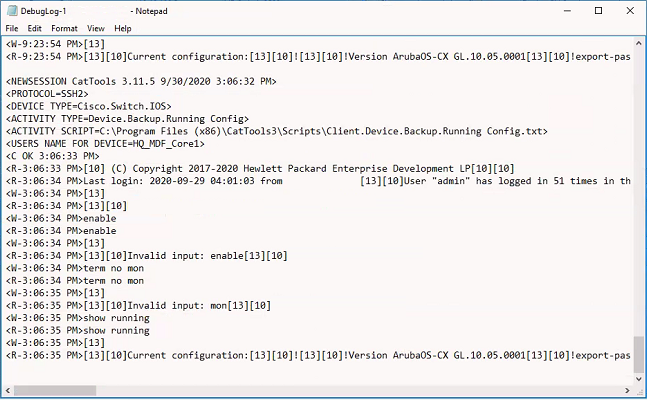
Note: Aruba CX switch with version 10.4 works well with the Cisco.Switch.IOS device type but Aruba CX switch with version 10.5 is where this issue occurs.
The Activity log may show the following entries:
Waiting for an echo of term no mon command
Waiting for an echo of terminal len 0 command
Waiting for an echo of show running command
After a moment, CatTools will show the 'Failed to download device config" error.
Reviewing the debug logs, the entries below may show.
Note: Aruba CX switch with version 10.4 works well with the Cisco.Switch.IOS device type but Aruba CX switch with version 10.5 is where this issue occurs.
Product section
Kiwi CatTools
Resolution
Possible resolutions:
1. Upgrade to the latest version of Cattools for HP.Switch.Aruba device script or
2. Keep the HP.Switch.Aruba device script device type or change it to Generic.Device.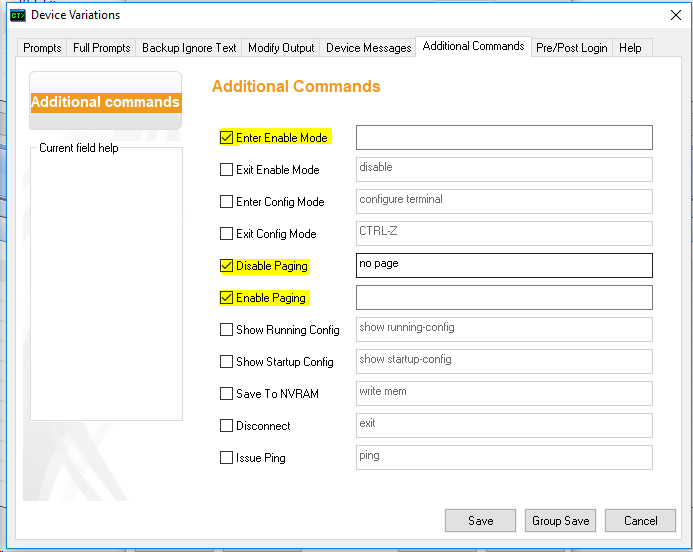
3. Verify if the 'exit' command asks for a logout response
1. Upgrade to the latest version of Cattools for HP.Switch.Aruba device script or
2. Keep the HP.Switch.Aruba device script device type or change it to Generic.Device.
- Edit the device Variations.
- Edit the device and go to the Variations tab > click the User Variations buttonGo to the Additional Commands tab
- Check the box beside 'Enter Enable Mode' and remove the 'enable' entry
- Check the box beside 'Disable Paging' and change the value to 'no page'
- Check the box beside 'Enable Paging' and remove the 'terminal len 24' entry
- Save the changes and run the activity again.
3. Verify if the 'exit' command asks for a logout response
- Log in to the Aruba device through PutTy
- Once logged in, enter the command 'exit'
- If the prompt asks for a logout response, ask the customer to have the logout prompt disabled from the device
- Ideally, the session should end once the 'exit' command is entered and it should not ask for a logout as this is also a security risk
- When the CatTools script runs the exit command and the device prompts for the logout response, CatTools does not have a way to respond back (with a Yes or No answer) so the connection is stuck, which results in CatTools not ending the session properly and not creating the backup file.