
Tools
Unable to Setup Modern Authentication for Office 365 e-mail due to permissions, getting an error: “Authorization failed with error access_denied “ in Web help Desk
This article described an issue where the Clients unable to Setup Modern Authentication for Office 365 e-mail due to permissions, getting an error: “Authorization failed with error access_denied “ in Web help Desk
First published date
8/20/2020 11:26 PM
Last published date
10/6/2021 3:11 AM
Overview
On Web Help Desk 12.7.2, You can now set up a new incoming e-mail account with Modern Authentication to access Microsoft Exchange Web Services (EWS) and your Office 365 e-mail.
However, in this issue, the Oath setup is failing due to permissions. When setting up the Modern Authentication for Office 365 e-mail accounts in We help desk, getting an error message:
"Authorization failed with error access_denied AADSTS650057: Invalid Resource: The client as requested access to a resource which is not listed in the requested permissions in the client's application registration"
Product section
Web Help Desk
Cause
API Permissions is not correctly setup.
Resolution
Change the API Permissions to Exchange by performing steps 15 - 20 in this article:
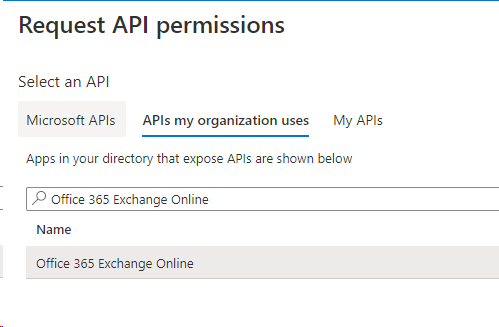
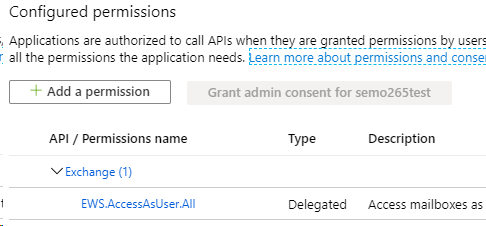
- In the navigation menu, click API Permissions.
- Click Add new permission.
- Navigate to APIs my organization uses Tab
- Search Office 365 Exchange Online
- Click and select Delegated permissions, and then maximize EWS.
- Under EWS, select EWS.AccessAsUser.All
- Remove any other pre-existing permissions from the remaining permission drop-down menus.
- When you are finished, you should have one for permission.