
Network Management
Website prompting an error message when trying to Edit or Create a User Account in Orion
This article will show how to quickly isolate and resolve an issue wherein unable to Edit or Create a User Account getting Unexpected Website Error Error
First published date
11/11/2021 1:59 AM
Last published date
11/25/2021 2:32 AM
Overview
Under Manage Accounts, unable to Edit any existing User Account or even Add New Account getting the similar error below:
Sample Image: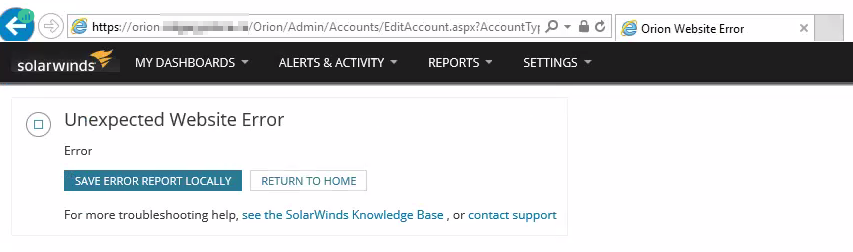
ERROR seen in the OrionWeb.log (C:\ProgramData\SolarWinds\Logs\Orion):
Sample Image:
2021-11-10 12:39:49,893 [228] (6) ERROR ASP.global_asax - (null)  Application_Error(1cdf229837364123b83d7fe56c2f154f)
System.ServiceModel.FaultException`1[System.ServiceModel.ExceptionDetail]: Error (Fault Detail is equal to An ExceptionDetail, likely created by IncludeExceptionDetailInFaults=true, whose value is:
System.ApplicationException: Error ----> System.ArgumentNullException: Value cannot be null.
Parameter name: userId
   at SolarWinds.Toolset.BusinessLayer.Services.LicenseSettingsService.GetSetting(String userId, String settingName, String defaultValue)
   at SolarWinds.Toolset.BusinessLayer.ToolsetBusinessLayerService.<>c__DisplayClass62_0.<GetSetting>b__0()
   at SolarWinds.Toolset.BusinessLayer.ToolsetBusinessLayerService.SafeCall[T](Func`1 method)
   --- End of inner ExceptionDetail stack trace ---
   at SolarWinds.Toolset.BusinessLayer.ToolsetBusinessLayerService.SafeCall[T](Func`1 method)
   at SolarWinds.Toolset.BusinessLayer.ToolsetBusinessLayerService.GetSetting(String userId, String settingName, String defaultValue)
   at SyncInvokeGetSetting(Object , Object[] , Object[] )
   at System.ServiceModel.Dispatcher.SyncMethodInvoker.Invoke(Object instance, Object[] inputs, Object[]& outputs)
   at System.S...).
Product section
Orion Platform
Cause
The SolarWinds Engineer's Toolset is currently installed but is no longer being used.
Resolution
- RDP to the Orion Server
- Run appwiz.cpl to launch the Programs and Features
- Locate and uninstall the SolarWinds Engineer's Toolset
- Run as Administrator and complete the Configuration Wizard