
Network Management
UDT polling failed on domain controllers
UDT is not Polling for User Logins: Error on the Manage Active Directory is "Polling failed, check security log access credentials"
First published date
2/7/2020 4:10 PM
Last published date
11/3/2022 7:44 AM
Overview
Polling status on AD domain controllers is showing Polling failed, check security log access credentials. Also, from the node details page, AD Domain Controller Polling Details NEXT POLL and LAST DATABASE UPDATE is outdated. Example:
NEXT POLL 11/29/2019 12:30 PM
LAST DATABASE UPDATE 11/29/2019 12:15 PM
NEXT POLL 11/29/2019 12:30 PM
LAST DATABASE UPDATE 11/29/2019 12:15 PM
Product section
User Device Tracker
Cause
Credentials are not assigned to domain controllers
Resolution
Resolution 1
1. Test the credential on the domain controller. Edit the node and test the WMI credentials - this should be successful.
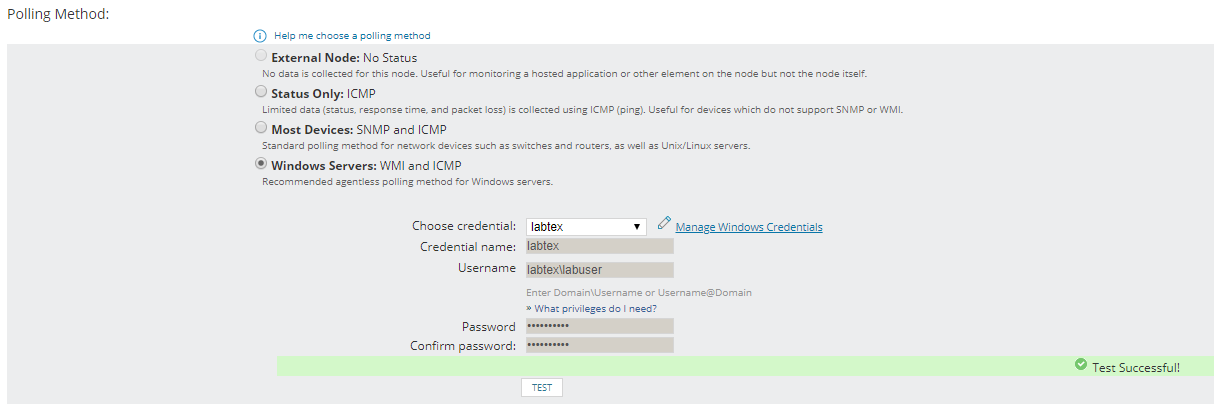
2. Go to Settings > UDT Settings > Manage Active Directory Domain Controller > Select the Domain Controller and assign security log access credential.
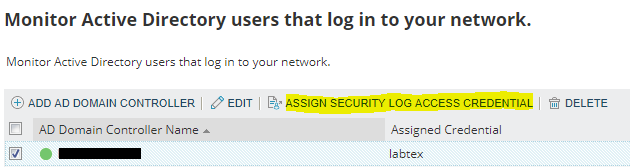
3. Do a poll now on the node. You can do it from the node details page or in UDT job status page (Settings > All Settings > View UDT job status)
4. Polling should now be okay.
Resolution 2
Increase polling interval to 40 minutes
1. Test the credential on the domain controller. Edit the node and test the WMI credentials - this should be successful.
2. Go to Settings > UDT Settings > Manage Active Directory Domain Controller > Select the Domain Controller and assign security log access credential.
3. Do a poll now on the node. You can do it from the node details page or in UDT job status page (Settings > All Settings > View UDT job status)
4. Polling should now be okay.
Resolution 2
Increase polling interval to 40 minutes