
Security Compliance
Troubleshooting-ARM server server won't start
The ARM server or the collector will not start or are always restarting.
First published date
12/1/2020 5:05 PM
Last published date
12/1/2020 5:43 PM
Overview
When troubleshooting the ARM server for not starting. You may come across the error or warning message
server is not started and you are not able start it. You may also come across an issue where the server or the collector are starting and stopping over and over. This may be due to the Cipher Suites.
server is not started and you are not able start it. You may also come across an issue where the server or the collector are starting and stopping over and over. This may be due to the Cipher Suites.
Product section
Access Rights Manager
Cause
ARM version 2020.2.2 or higher the Cipher Suites are missing
this could be caused by the customer disabling TLS, or antivirus.
this could be caused by the customer disabling TLS, or antivirus.
Resolution
Make sure on the accepted suites is enabled. You can use the free tool IISCrypto 3.2
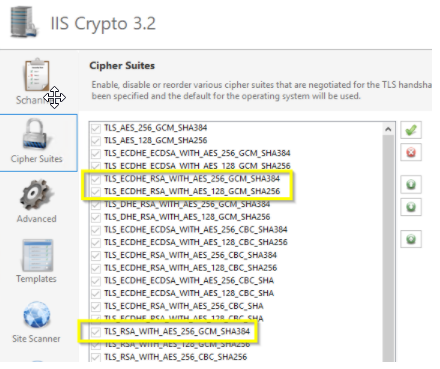
accepted Cipher Suites
accepted Cipher Suites
- ECDHE-RSA-AES256-GCM-SHA384 https://ciphersuite.info/cs/TLS_ECDHE_RSA_WITH_AES_256_GCM_SHA384/
ECDHE-RSA-AES128-GCM-SHA256 https://ciphersuite.info/cs/TLS_ECDHE_RSA_WITH_AES_128_GCM_SHA256/
TLS_RSA_WITH_AES_256_GCM_SHA384 https://ciphersuite.info/cs/TLS_RSA_WITH_AES_256_GCM_SHA384/
- gRPC is using only HTTP 2.0 protocol independently of the Windows version.
- TLS 1.2 by default
- gRPC supplies the own TLS client and TLS server components which are working with TLS 1.2 protocol by default.