
Security Compliance
Troubleshoot ARM collectors errors in non-trusted domains
Problems and fixes when ARM collectors run in non-trusted domain
First published date
1/31/2020 11:39 AM
Last published date
8/30/2023 2:27 PM
Overview
This article is a place holder for common problems customers might face when running collectors in non-trusted domain.
Scenario 1: Collector is connected by Credentials not saved
Two Domains with ARM in local domain and the collector in other domain. After Migration from Server 2008r2 to 2019 they were not able to save the admin credentials for the collector in foreign Domain.
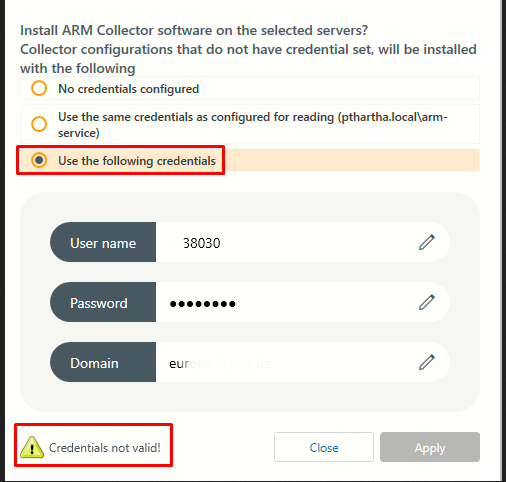
The collector is member Server in foreign domain. All Systems have the old IPs so the Firewall rules are working fine. Collector was added with IP on default ARM Port 55555 this works fine.

When they used the foreign domain Admin credentials to assign to the collector, get the error message: Credentials invalid. Credentials were checked multiple time and copy and pasted, still same.
Scenario 1: Collector is connected by Credentials not saved
Two Domains with ARM in local domain and the collector in other domain. After Migration from Server 2008r2 to 2019 they were not able to save the admin credentials for the collector in foreign Domain.
The collector is member Server in foreign domain. All Systems have the old IPs so the Firewall rules are working fine. Collector was added with IP on default ARM Port 55555 this works fine.
When they used the foreign domain Admin credentials to assign to the collector, get the error message: Credentials invalid. Credentials were checked multiple time and copy and pasted, still same.
[  533|ARM  |appConfig   |5828.1|  1|pn.vampir.controls.…edentialInputOverlay|200129|11:00:14.405|Info   ] CredentialInputOverlay.OnConfirmExecute(Object obj): Can not confirm, because current state is 'CredentialsNotTrusted'

[3874 | ARM | armServer | 6676.1 | 81 | server\SYSTEM | pn.helper.DomainHelper | 200129 | 11: 00: 14.403 | Error] DomainHelper.ValidateCredential (String username, String domain, String password): System.DirectoryServices.Protocols.LdapException: The LDAP server is not available.
Product section
Access Rights Manager
Cause
- DNS entry of collector host not added to ARM server in etc/hosts
Resolution
Please follow solutions for the scenarios applicable to you.
Scenario 1:
1. On ARM server Add DNS entry of the collector host to C:\Windows\System32\drivers\etc\hosts
2. Restart the ARM service
Scenario 1:
1. On ARM server Add DNS entry of the collector host to C:\Windows\System32\drivers\etc\hosts
2. Restart the ARM service