
Applications Systems
How the Deprecated WPM Recorder handles account permissions
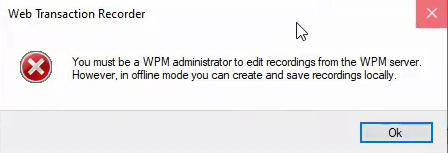
Learn how the Deprecated WPM Recorder handles account permissions for domains, group names, and Active Directory. For example, you may receive the following message when logging into the WPM Recorder: You must be a WPM administrator to edit recordings from the WPM server.
First published date
4/16/2020 10:37 PM
Last published date
5/1/2020 2:50 AM
Overview
This article describes how the Deprecated WPM Recorder introduced in earlier versions of WPM handles domain accounts, groups, and Active Directory permissions. These details may prove useful if you encounter messages such as the one shown here:
Important: SolarWinds recommends using the new Web Transaction Recorder introduced in WPM 3.0 instead of the Deprecated WPM Recorder from WPM 2.2.3 and earlier. Future WPM releases may not support the ability to edit recordings or play transactions that originate in the Deprecated WPM Recorder. To learn about deploying the new recorder, see the WPM Getting Started Guide. To learn how the new recorder handles account permissions, see the WPM Administrator Guide.
WPM relies on different types of Orion accounts, including:
Here is an overview of how the Deprecated WPM Recorder authenticates the ability of a user to connect a Deprecated WPM Recorder to the Orion server:
Important: SolarWinds recommends using the new Web Transaction Recorder introduced in WPM 3.0 instead of the Deprecated WPM Recorder from WPM 2.2.3 and earlier. Future WPM releases may not support the ability to edit recordings or play transactions that originate in the Deprecated WPM Recorder. To learn about deploying the new recorder, see the WPM Getting Started Guide. To learn how the new recorder handles account permissions, see the WPM Administrator Guide.
WPM relies on different types of Orion accounts, including:
- Individual Orion accounts, such as admin or guest
- Individual domain Windows accounts (domain\username)
- Domain group accounts (domain\groupname)
Here is an overview of how the Deprecated WPM Recorder authenticates the ability of a user to connect a Deprecated WPM Recorder to the Orion server:
- Checks if the individual Orion account or domain windows account exists in the Orion database.
- If step 1 fails, WPM checks if the account belongs to any domain group account.
- If step 1 or 2 succeeds, WPM determines if an entry for the ‘domain\username’ user account exists in the Orion.SEUM.WebUserPermissions SWIS table and is set up as a WPM Administrator.
Product section
Web Performance Monitor
Resolution
- You must be a WPM administrator to edit recordings from the WPM server
- WPM Recorder Receiving 401 - Unauthorized: Access is denied due to invalid credentials
- Cannot Access WPM Recorder - Configuration is incorrect
- WPM Recorder not connecting to orion server with Error: Configuration is incorrect. Please enter valid configuration