
Network Management
'Top XX Interfaces by Percent Utilization' widget shows invalid/missing information
Filters in the 'Top XX Interfaces by Percent Utilization' widget can affect the way interfaces are shown in it. This article will show steps to clear filters that may interfere with how you view this widget.
First published date
4/26/2019 8:43 AM
Last published date
3/7/2022 11:27 AM
Overview
When reviewing top interfaces using the 'Top XX Interfaces by Percent Utilization' widget, you may notice missing and/or invalid information.
Product section
Network Performance Monitor
Cause
'Filter Interfaces' field is not configured properly.
Resolution
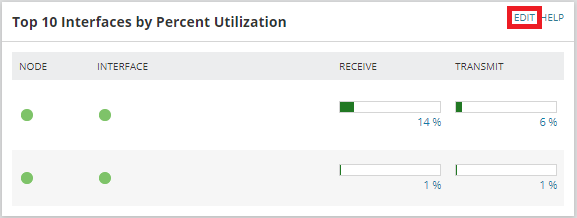
1. On the 'Top XX Interfaces by Percent Utilization' widget, click EDIT to adjust how it is configured.
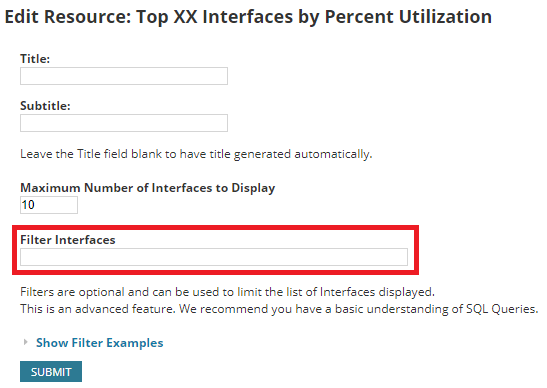
2. Clear the filters in the 'Filter Interfaces' field.
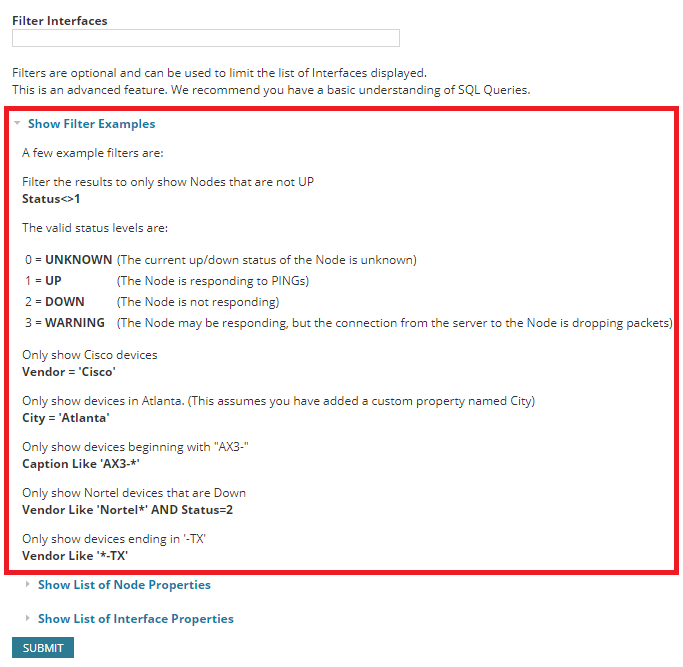
3. (Optional)Set correct filters based on the examples already shown in the 'Edit Resource' page
4. Click 'SUBMIT' to commit the changes.
For more information about managing widgets in the Orion web console, visit the Customize the Orion Web Console look, views, settings, charts, and maps in the Orion Platform section of the Orion Platform Administrator Guide
2. Clear the filters in the 'Filter Interfaces' field.
3. (Optional)Set correct filters based on the examples already shown in the 'Edit Resource' page
4. Click 'SUBMIT' to commit the changes.
For more information about managing widgets in the Orion web console, visit the Customize the Orion Web Console look, views, settings, charts, and maps in the Orion Platform section of the Orion Platform Administrator Guide