
Tools
Ticket still shows pending after a CAB approver has denied the request in the approval process in WHD
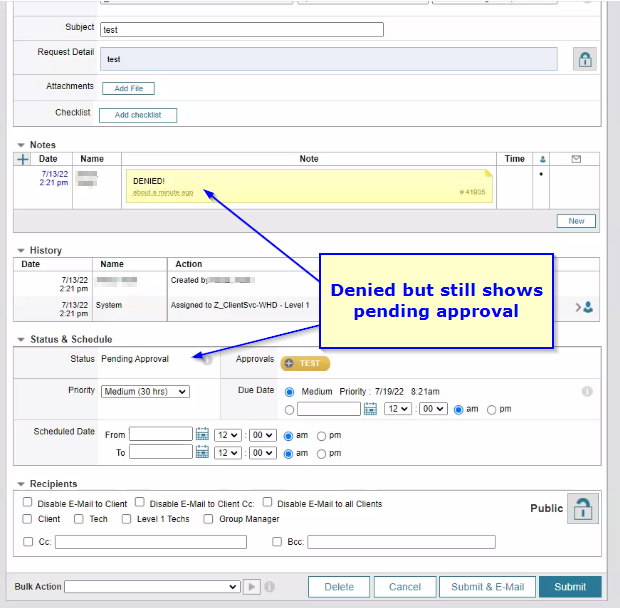
When a ticket needs to go through an approval process and one of the CAB members denies the request, it still shows pending approval, even though the Minimum Approvers field is set to 1 (one).
First published date
7/26/2022 4:23 PM
Last published date
7/26/2022 4:23 PM
Overview
A WHD ticket that needs to be approved by a CAB is denied by one of the CAB members, but the status of the ticket still shows as pending approval and CAB minimum approvers is set to one.
Product section
Web Help Desk
Cause
A Change Advisory Board, or CAB, requires every member of the CAB to deny a request in order for the status change to Denied.
Resolution
A Change Advisory Board, or CAB, is intended to be used as a way to have a team of people review a request and vote on it.
It is set so that if a minimum number of approvers agree, then it is approved.
In order to deny a request, all the CAB members need to deny it for the status to show as denied.
Example 1:
It is set so that if a minimum number of approvers agree, then it is approved.
In order to deny a request, all the CAB members need to deny it for the status to show as denied.
Example 1:
- A CAB is created with 2 members and the minimum approvers is set to 1, and a request is submitted
- If one CAB member denies the request and the other does nothing
- It will remain in Pending Approval, because there has not been an approval
- If one CAB member denies the request and the other approves the request
- The request will show as approved
- If both CAB members deny the request
- It will show as denied
- If one CAB member denies the request and the other does nothing
- A CAB us created with 5 members with the minimum approvers set to 3 (majority vote)
- A request is submitted to upgrade a server to the latest version
- In order for the request to be approved, at least 3 CAB members must vote Yes, or the status will remain in Pending Approval
- If two vote No and three vote Yes, the request is approved
- In order to deny the request, all 5 CAB members must vote No