
Tools
Use Serv-U event filter not to trigger event on specific directory path
This article describes how to use event filters to filter an event that should run or not.
First published date
10/9/2020 4:44 PM
Last published date
10/9/2020 4:44 PM
Overview
Serv-U event filter is used to filter the event based on the available criteria. It can be used if you have a Serv-U event, but the admin would not want to trigger it on specific occasions.
In this scenario, the File download event is set and then execute a command. The command will delete the files after the user downloaded it, but it should not trigger on a specific directory path.
In this scenario, the File download event is set and then execute a command. The command will delete the files after the user downloaded it, but it should not trigger on a specific directory path.
Product section
Serv-U Managed File Transfer & Serv-U FTP Server
Resolution
1. Open the Serv-U Event then select the Event you want to filter.
2. Go to the Event Filters.
3. Click Add, set the name of the filter.
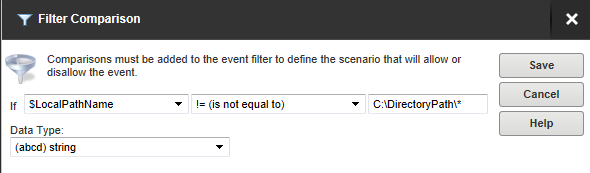
4. Click Add, put the following value then save it.
Variable: $LocalPathName
Comparison: is not equal to
Constant: C:\DirectoryPath\*
2. Go to the Event Filters.
3. Click Add, set the name of the filter.
4. Click Add, put the following value then save it.
Variable: $LocalPathName
Comparison: is not equal to
Constant: C:\DirectoryPath\*