
Tools
The user cannot deploy scripts from the Dameware Remote Everywhere (DRE) admin area, it shows, "You do not have permission to access this feature."
The article describes the notification prompts when deploying scripts in DRE and how to resolve it.
First published date
8/27/2020 1:16 AM
Last published date
8/27/2020 1:16 AM
Overview
The technician should be able to deploy scripts from the DRE admin area as long as they have permission. If the technician does not have permission, they will get a notification "Something went wrong, You do not have permission to access this feature."

Product section
Dameware Remote Everywhere
Cause
The technician does not have the necessary permission to deploy scripts.
Resolution
1. Check the technician profile in the DRE admin area.
2. Go to the Management, click Technicians.
3. Select the technician profile, select Permissions.
4. Click the Admin Area.
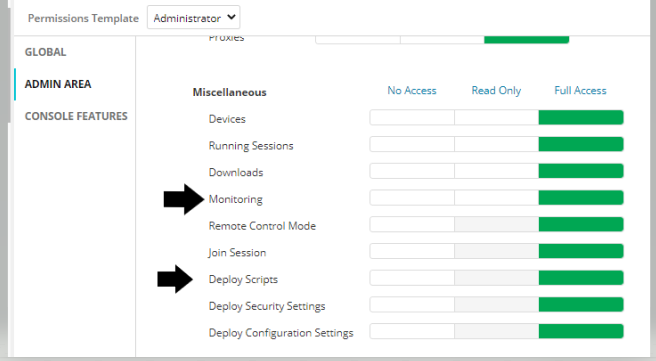
5. Make sure that Deploy Scripts has full access and Monitoring at least have read access.
2. Go to the Management, click Technicians.
3. Select the technician profile, select Permissions.
4. Click the Admin Area.
5. Make sure that Deploy Scripts has full access and Monitoring at least have read access.