
Applications Systems
The WS-Management service cannot process the request because the XML is invalid in SAM
When using WInRM to queries for anything in winrm enum wmicimv2, an error occurs
First published date
6/14/2022 6:10 PM
Last published date
2/26/2025 2:30 AM
Overview
When utilizing WinRM to run a script or get a specific performance counter from Windows, a misleading error occurs showing that the XML is invalid.
The WS-Management Protocol defines the MaxEnvelopeSize value to indicate that the client expects a response to be no larger than the given number of octets, as specified per environment.
Error number: -2144108477 0x80338043
The WS-Management service cannot process the request because the XML is invalid.
The WS-Management Protocol defines the MaxEnvelopeSize value to indicate that the client expects a response to be no larger than the given number of octets, as specified per environment.
Error number: -2144108477 0x80338043
The WS-Management service cannot process the request because the XML is invalid.
Product section
Server Application Monitor
Cause
This is caused by the default size of MaxEnvelopeSizeKB in Windows is less than the required amount of the PowerShell script or the data you try to parse from Windows.
Resolution
1. Get the current MaxEnvelopeKBSize in windows and run one of the below commands as admin in Powershell:
winrm get winrm/config
or
Get-Item -Path WSMan:\localhost\MaxEnvelopeSizeKb
You will see something like this:
a) Using Powershell: Set-WSManInstance -ResourceURI winrm/config -ValueSet @{MaxEnvelopeSizekb = "<desiredvalue>"}
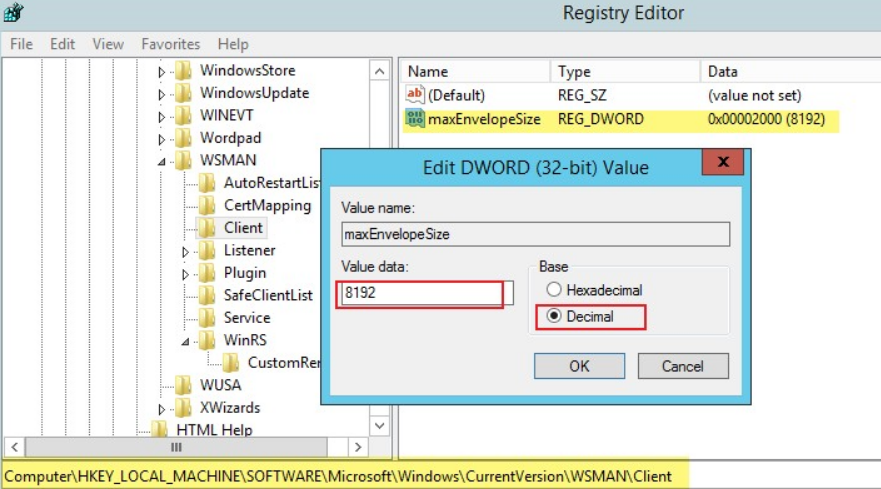
b) Using RegEdit:
Navigate to HKEY_LOCAL_MACHINE\SOFTWARE\Microsoft\Windows\CurrentVersion\WSMAN\Client
Double click "maxEnvelopeSize" in the right pane, choose "Decimal", and change the value to the desired amount
winrm get winrm/config
or
Get-Item -Path WSMan:\localhost\MaxEnvelopeSizeKb
You will see something like this:
Config
    MaxEnvelopeSizekb = 500
    MaxTimeoutms = 60000
    MaxBatchItems = 32000
    MaxProviderRequests = 4294967295
    Client
etc............................................................
2. There are 2 ways to change the MaxEnvelopeSizekb:a) Using Powershell: Set-WSManInstance -ResourceURI winrm/config -ValueSet @{MaxEnvelopeSizekb = "<desiredvalue>"}
cfg                 : http://<microsoft.schema>/wbem/wsman/1/config
lang                : en-US
MaxEnvelopeSizekb   : xxxxxx
MaxTimeoutms        : 60000
MaxBatchItems       : 32000
MaxProviderRequests : 4294967295
Client              : Client
Service             : Service
Winrs               : Winrs
b) Using RegEdit:
Navigate to HKEY_LOCAL_MACHINE\SOFTWARE\Microsoft\Windows\CurrentVersion\WSMAN\Client
Double click "maxEnvelopeSize" in the right pane, choose "Decimal", and change the value to the desired amount