
Network Management
The Submit button on the Polling Settings page is not working
Clicking on the Submit button only refreshes the page and does not save the changes made on the Polling Settings page.
First published date
10/29/2018 4:00 PM
Last published date
10/29/2018 4:00 PM
Overview
Clicking on the Submit button only refreshes the page and does not save the changes made on the Polling Settings page.
Product section
Orion Platform
Cause
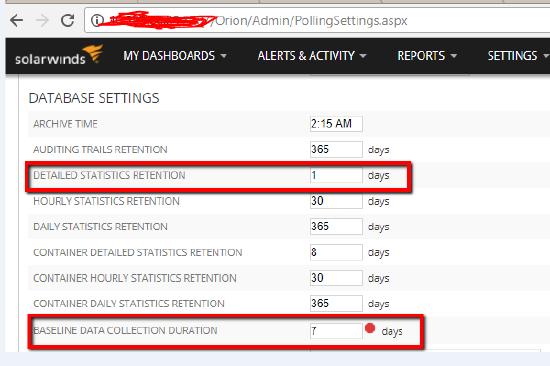
The BASELINE DATA COLLECTION DURATION is greater than the DETAILED STATISTICS RETENTION which is 7 days by default.
Resolution
- Set the BASELINE DATA COLLECTION DURATION to less than or equal to the value of DETAILED STATISTICS RETENTION
- Click the Submit button
- If problem remains, look for any values with a red blip beside them
- Change those values to be within the recommended settings in popup
- Click the Submit button