
Database Management
Task Factory – SFTP Task Connection Attempt Failed
First published date
7/30/2021 3:50 PM
Last published date
7/30/2021 3:50 PM
Overview
ExecuteTask Failed:] Error: A connection attempt failed because the connected party did not properly respond after a period of time, or established connection failed because connected host has failed to respond 129.130.13.3:49088
Product section
Task Factory (TF)
Resolution
There are many times when an error returned is difficult to troubleshoot. When it comes to the SFTP Task many of the issues experienced are a result of a bad Connection to the Server, a blocked connection to the server or the server randomly closing an existing connection.
All of these issues are controlled by the SFTP Server itself and not actually the Task Factory component. Obviously, this will hinder the ability of the technician to fully assist in resolving the behavior as we do not have credentials to their SFTP Server or a way to act as an Admin on their Server.
Much of the troubleshooting in this particular circumstance will have to come from the User himself/herself.
For the error message referenced above, this usually indicates the server being used is not a Secure FTP Server.
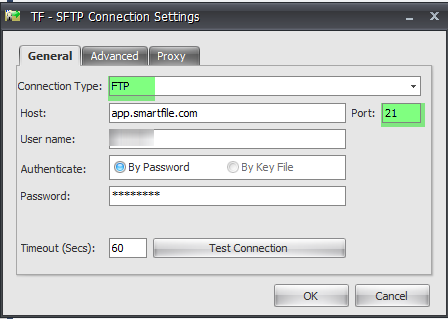
If the user is able to determine the server is actually an unsecured server, the user can modify their SFTP Connection Manager to use the Connection Type: FTP; with PORT set to 21.
See screenshot below:
For more information on our SFTP task please click here .
All of these issues are controlled by the SFTP Server itself and not actually the Task Factory component. Obviously, this will hinder the ability of the technician to fully assist in resolving the behavior as we do not have credentials to their SFTP Server or a way to act as an Admin on their Server.
Much of the troubleshooting in this particular circumstance will have to come from the User himself/herself.
For the error message referenced above, this usually indicates the server being used is not a Secure FTP Server.
If the user is able to determine the server is actually an unsecured server, the user can modify their SFTP Connection Manager to use the Connection Type: FTP; with PORT set to 21.
See screenshot below:
For more information on our SFTP task please click here .