
Network Management
Submit button on List Resources page unresponsive in Orion Web Console when accessing nodes assigned to additional poller
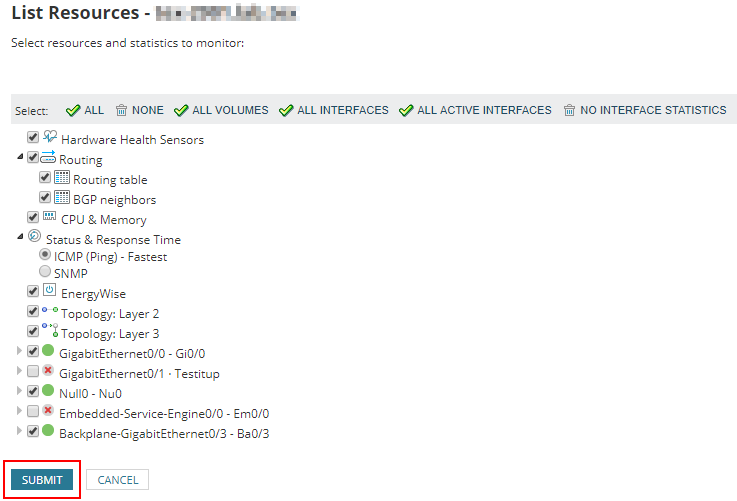
After listing resources on a node assigned to an additional poller the submit button is not operational
First published date
1/15/2020 1:47 PM
Last published date
3/7/2022 7:21 AM
Overview
When listing resources on a node assigned to an additional poller the list resources works fine but changes cannot be submitted as the submit button does nothing.
Product section
Orion Platform
Cause
1. Mismatch between the pub/sub messaging system used between the main poller and the APE
2. APE date and time is not synchronized with Main Poller and Orion DB
2. APE date and time is not synchronized with Main Poller and Orion DB
Resolution
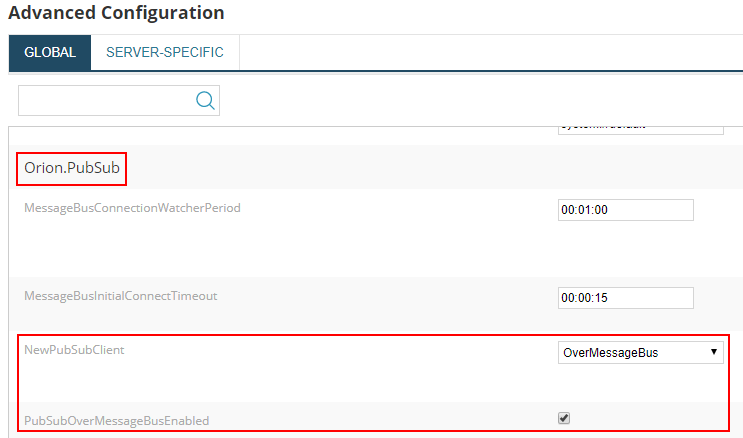
From the diagnostics we could see that the global setting for pub sub had
NewPubSubClient set to "OverMessageBus"
and
PubSubOverMessageBusEnabled set to "True".
On the APE we saw a conflict where the NewPubSubClient was set to "OverWCF"
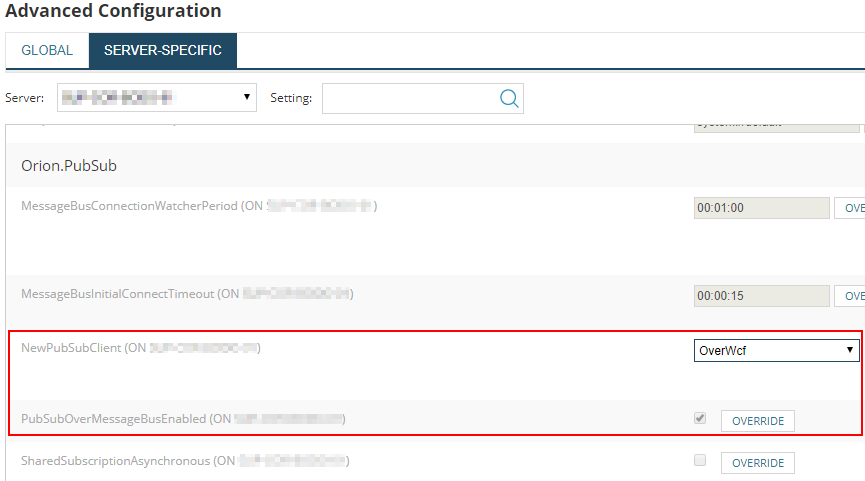
The solution is to set the pubsub client to the same as the main poller and clear the pubsub cache...
Navigate to /Orion/Admin/AdvancedConfiguration/ServerSpecific.aspx from the Orion web console:
Select the appropriate poller from the drop down list
Set
Clear pubsub cache
Another Workaround
1. Check and Make sure that APE date and time is synchronized with Main Poller and Orion DB
NewPubSubClient set to "OverMessageBus"
and
PubSubOverMessageBusEnabled set to "True".
On the APE we saw a conflict where the NewPubSubClient was set to "OverWCF"
The solution is to set the pubsub client to the same as the main poller and clear the pubsub cache...
Navigate to /Orion/Admin/AdvancedConfiguration/ServerSpecific.aspx from the Orion web console:
Select the appropriate poller from the drop down list
Set
NewPubSubClient to "OverMessageBus"
and
PubSubOverMessageBusEnabled to "True".
Ensure all servers are configured as above.Clear pubsub cache
- Stop services on the both the main poller and the APE
- Connect to the Orion DB using Database Manager or SQL Server Management Studio [Ensure that you have a current backup of the Orion DB as these changes cannot be undone]
- Execute the following queries
DELETE FROM PendingNotifications
DELETE FROM Subscriptions
DELETE FROM Subscriptiontags
DELETE FROM LimitationSnapshots
DELETE FROM ContainerMemberSnapshots
DELETE FROM Subscriptions
DELETE FROM Subscriptiontags
DELETE FROM LimitationSnapshots
DELETE FROM ContainerMemberSnapshots
- Start services on the main poller
- Start services on the APE
Another Workaround
1. Check and Make sure that APE date and time is synchronized with Main Poller and Orion DB