
Network Management
Sort the left-hand pane of the Manage Subnets and IP Addresses page in IPAM by Display Name rather than by IP Address
This article describes how to change the sort order for the left-hand pane of the Manage Subnets and IP Addresses page in IPAM
First published date
1/15/2020 9:54 AM
Last published date
1/3/2025 7:17 PM
Overview
By default the left-hand pane of the Manage Subnets and IP Addresses view is sorted by IP Address. This article outlines how to change the sorting method to use the Display Name.
Product section
IP Address Manager
Cause
N/A
Resolution
Note:
Hierarchy groups are not sorted by name. They maintain their original sort order.
From the Orion/IPAM web console: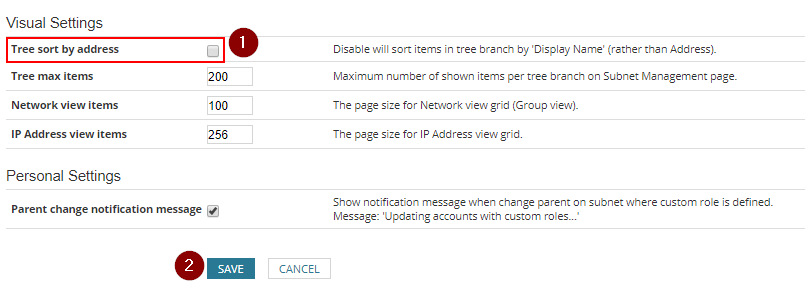
Hierarchy groups are not sorted by name. They maintain their original sort order.
From the Orion/IPAM web console:
- Navigate to: Settings -> All Settings -> IPAM Settings -> System Settings
- Uncheck the checkbox "Tree sort by address"
- Click Save