
Security Compliance
Some computers missing in Managed Computer view of Patch manager MMC console
This article provides information about why sometimes the managed computer view does not show all computers.
First published date
11/11/2019 3:31 PM
Last published date
11/11/2019 3:31 PM
Overview
You sometimes notice that the Managed computer inventory task runs successfully without any exceptions and errors. However, the total count of computer in Managed computer inventory view do not match the individual totals for all the computers in different patch manager Computer groups.
For example, suppose you have Patch manager computer groups call PMCG_Clients and PMCG_Servers with each containing 6 computers.
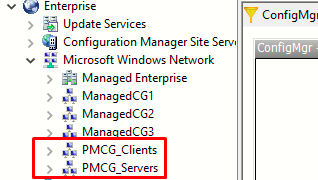
However when you run the Managed Computer inventory for PMCG_Clients and PMCG_Servers, the total count is showing 10 instead of 12
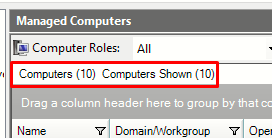
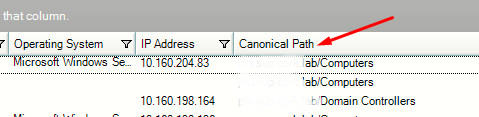
And you have verified each group views i.e PMCG_Clients and PMCG_Servers, the total should be 12. The problem is causing by incorrect canonical path for the missing computers.
For example, suppose you have Patch manager computer groups call PMCG_Clients and PMCG_Servers with each containing 6 computers.
However when you run the Managed Computer inventory for PMCG_Clients and PMCG_Servers, the total count is showing 10 instead of 12
And you have verified each group views i.e PMCG_Clients and PMCG_Servers, the total should be 12. The problem is causing by incorrect canonical path for the missing computers.
Product section
Patch Manager
Cause
- Incorrect/missing canonical path
Resolution
1. Select the computer group PMCG_Client and Right click on it and click on "Computer Group Properties"
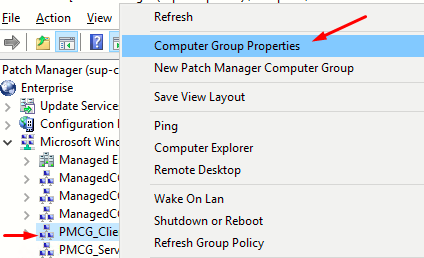
2. Select the computer in the middle pane and click on Change canonical path a dialog box appears to fill in the correct path
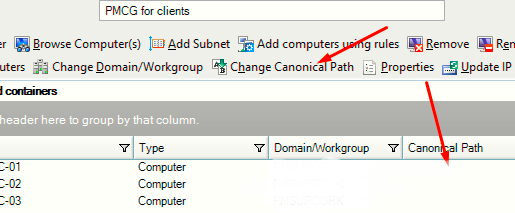
3. To get the correct canonical path you can run the following powershell command(note, this requires an account with permission to query the AD)
2. Select the computer in the middle pane and click on Change canonical path a dialog box appears to fill in the correct path
3. To get the correct canonical path you can run the following powershell command(note, this requires an account with permission to query the AD)
Get-ADComputer <computername> -Properties * | Select CanonicalName4. Re-run the inventory tasks for these computers and verify the total count under Managed Computer view